Turn on the free, opt-in Echo hardened runtime for your NanoClaw agents.
The hardened runtime is free and opt-in. Your existing local-build setup keeps working exactly as it does today. Choosing the hardened runtime is additive, not a replacement.
Every NanoClaw agent runs inside an isolated sandbox container. You can build that image locally from a public base — a 3–10 minute build that you own keeping patched. For supported Claude installs, the fresh-install wizard recommends fetching the hardened image instead.The Echo hardened runtime replaces the local build with a pre-built, patched image. Through the NanoClaw and Echo partnership, Echo rebuilds the sandbox software from minimal components and keeps it patched on its own CVE cadence; NanoClaw delivers it from a gated registry, pinned by digest, so the bytes you run are exactly the bytes that were scanned. NanoClaw is the first open-source agent framework to offer its community a hardened agent environment.The image bakes the sandbox’s essential components:
Runtime and tools — Node 22, Bun, pnpm, git, curl, unzip, and tini
Browser — Chromium, with the fonts and libraries it needs
Agent layer — the agent runner’s dependencies and the bundled agent CLIs, including Claude Code
The pre-built image currently ships for the Claude provider. If you pick a different provider during setup, the installer builds the sandbox locally instead, and a group that later switches providers will prompt before leaving the pre-built image.
Smaller attack surface. Stripping the environment down to essential components takes the known-vulnerability count from thousands to near zero.
Patched for you. Echo rebuilds the image on its own CVE cadence, so patch currency in layers you did not write — OS packages, Chromium, glibc — is no longer your job.
No local build. Fetching swaps the 3–10 minute local build for a single download of roughly 800 MB — typically a few minutes, longer on distant or slow links (it’s served from a single US region). Both paths stay available.
Zero cost. The hardened runtime is free — authenticating with NanoClaw is all it takes. There is no paid tier.
Fully optional. Building locally stays supported, unauthenticated, and untracked.
The hardened runtime greatly reduces exposure to known vulnerabilities. It is not a guarantee against all risk, and no environment is fully immune from attack. Run it as one layer of a broader security posture — it does not replace egress lockdown, mount allowlists, or resource limits, which contain what an agent can do at runtime.
A machine that meets the standard NanoClaw installation requirements.
A NanoClaw sign-in. You authenticate (or sign up) during setup; there is no separate paid plan to purchase.
Agents on the Claude provider (see the note above).
Fetching the image requires authenticating with NanoClaw: your email address and the fact that you fetched an image are recorded. Building locally sends nothing.
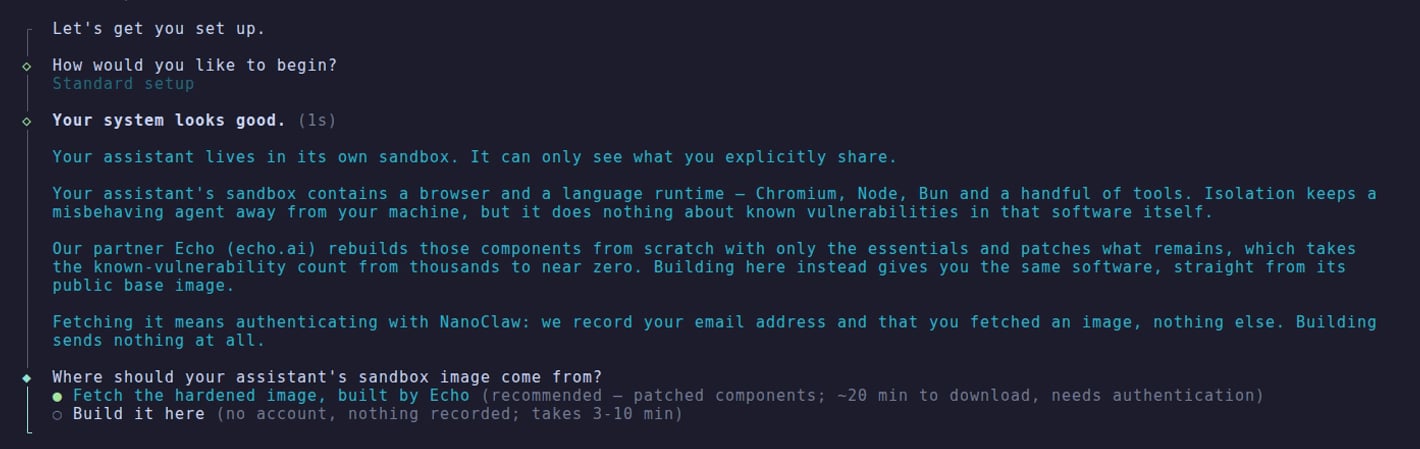
The wizard asks “Where should your assistant’s sandbox image come from?”. Pick “Fetch the hardened image, built by Echo” — the pre-selected, recommended choice — instead of “Build it here”.
The wizard's sandbox image choice — the pre-built, patched image is the recommended default.
3
Sign in to NanoClaw
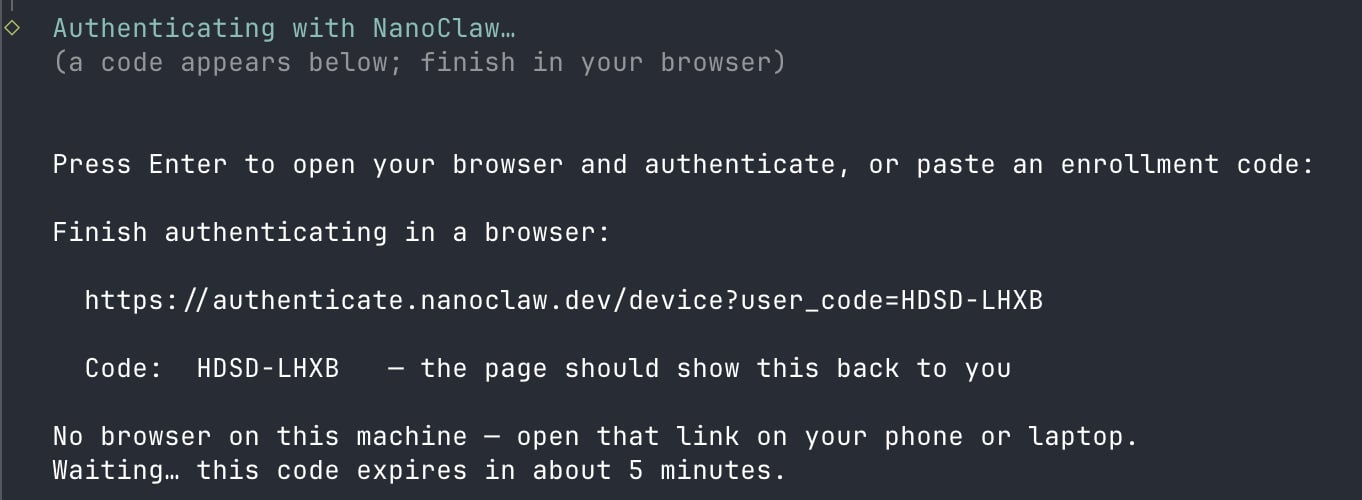
The terminal prints a link and a short code, and your browser opens on its own — if it doesn’t, open the link on any device. The terminal tells you how long the code is good for, and it stops waiting when the code expires, at 15 minutes at the latest.
The terminal sign-in card: the link to open and the code the page will show back to you.
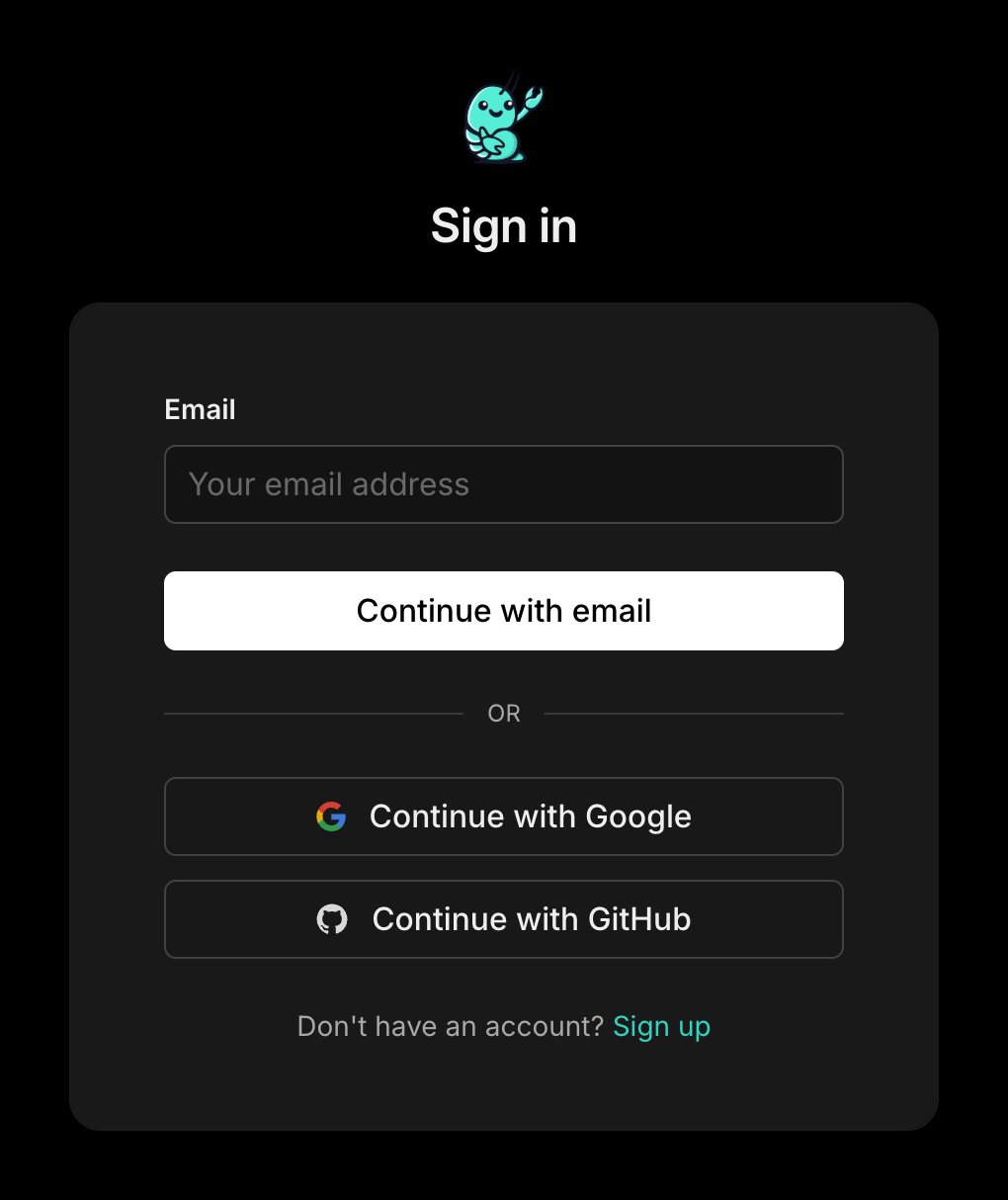
The page asks you to sign in, or sign up:
Sign in with email or a linked account.
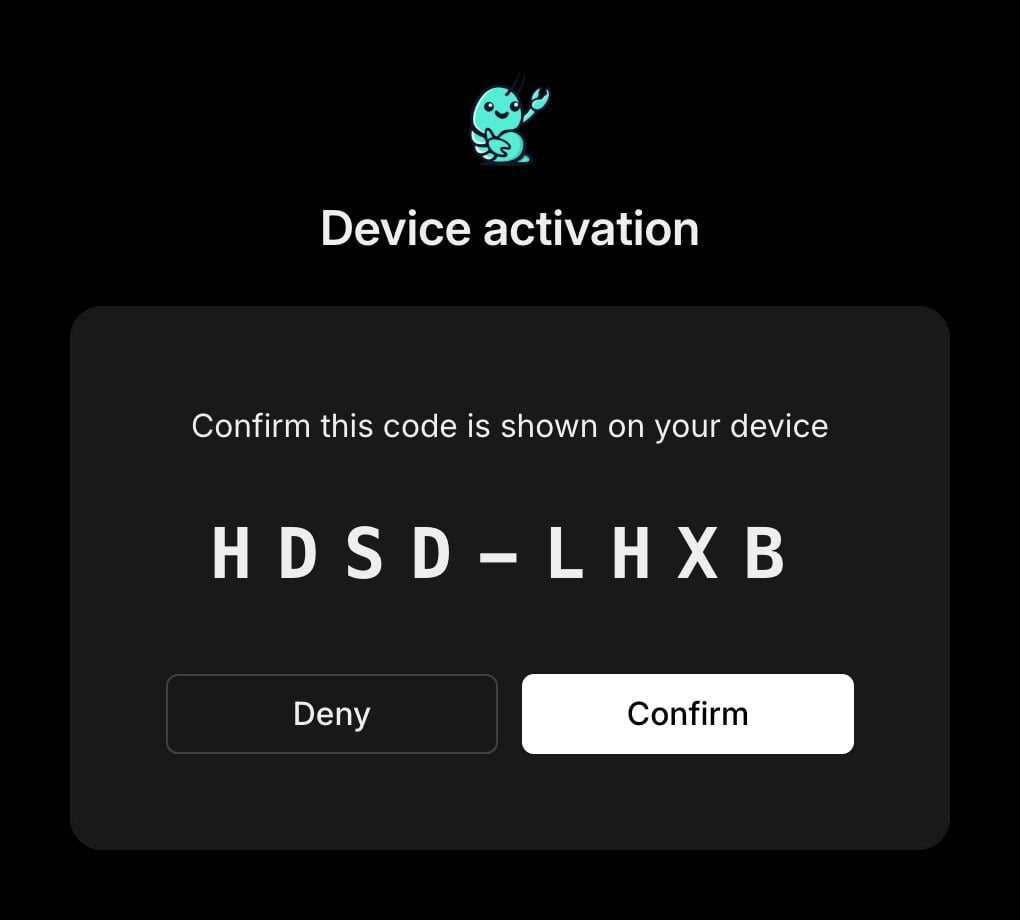
Then it shows the code back to you — confirm it matches your terminal:
The browser confirms the code from your terminal.
Done — the terminal picks it up from here.
If authentication doesn’t finish, setup says so and builds the sandbox locally instead — nothing breaks, and you can opt in later.
4
Finish the install
Let the installer finish. It pulls the image by its pinned digest and checks the architecture and agent-runner lock label before tagging it as this install’s sandbox image. Wrong architecture fails. A missing lock label fails unless you explicitly allow an unlabeled image; a mismatched label currently warns and continues, as described below.
The pull accepts a lockfile that does not match your checkout. Every published hardened image still carries the v2.2.0 agent-runner lockfile, so refusing the tag would block every new hardened install. The pull prints Warning: agent-runner lock drift — tagging this image anyway. and continues. Upstream marks this temporary. If an agent then dies on a missing module, build locally with ./container/build.sh build.
That path is fully supported and is not going anywhere. The local build is not deprecated, needs no account, and sends nothing to anyone. If you would rather build and manage the sandbox image yourself, keep doing exactly that. The hardened runtime is simply an additional option.
After setup, confirm what your agents are actually running:
pnpm exec tsx setup/index.ts --step registry
The status report shows:
Image source — how this install gets its image: pull a pinned image or build here
On this machine — what is actually present locally
Pinned — the image reference this install tracks
Signed in as — the account, if any
Perks: the entitlements on the account, listed only when it has any
Docker helper: which registry hosts Docker asks NanoClaw for credentials on, or not installed
Provenance also rides in the image itself: the dev.nanoclaw.image-source label reads hardened for the pulled image, local for a local build, and derived for a per-group image extended on top of the pulled one.
A repin is not merged on trust. A CI workflow re-checks the new digest on every pull request, and the checks finish at once when the pin has not changed, before the change can reach you.Four checks block the merge. They run on every pull request, and finish at once when the pin has not changed:
The reference must be digest-pinned. A mutable tag fails.
The image must be a multi-architecture index covering linux/amd64 and linux/arm64.
The dev.nanoclaw.agent-runner-lock-sha256 label must equal the checkout’s own agent-runner lockfile hash.
The dev.nanoclaw.image-source label must read hardened.
A manifest whose size moves by more than threefold in either direction raises a warning rather than blocking.One more check is reported but does not block: a keyless Sigstore signature is verified against the digest with cosign verify. The result goes to the job summary for the person who merges. An image with no verified signature does not fail the pull request. Nothing in the workflow merges anything; a person merges every repin.
No attestation or SBOM is checked, because the publisher attaches none. The workflow verifies the image’s shape and, when present, its signature.
Signing in stores a credential for the registry. Your install can re-check that credential against the account service.An account service it cannot reach keeps the stored sign-in and carries on, so an offline machine still pulls its image. The message names the reason:
Couldn't reach the account service (<reason>); keeping the stored sign-in.
Unreachable is broader than offline. Any response that is not 200, 401, or 403 lands there, including a gateway error. A caller that would rather refuse than proceed unchecked passes --require-verified, which exits 2 instead of 0. Nothing on the image path passes it today.
Signing in for Slack no longer decides your image source for you. That flow signs in through the same script, then puts the image question back: a deliberate local-build choice is restored, and an install that was never asked goes back to unasked. A plain bash setup/registry-login.sh still selects the hardened image.
Yes. The hardened runtime is free and opt-in — authentication is all it takes. There is no paid tier to unlock it.
Do I have to use it?
No. The local build stays fully supported. The hardened runtime is an additional option, not a requirement, and existing installs are not changed unless you opt in.
Does this make my agents impossible to attack?
No. The hardened runtime reduces exposure to known vulnerabilities by stripping the environment down to essential components. It does not remove all risk, and no environment is fully immune from attack. Runtime containment — egress lockdown, mount allowlists, resource limits — still does the heavy lifting.
What software is included?
The essential components of the sandbox:
Runtime and tools — Node 22, Bun, pnpm, git, curl, unzip, and tini
Browser — Chromium, with the fonts and libraries it needs
Agent layer — the agent runner’s dependencies and the bundled agent CLIs, including Claude Code
Who keeps it patched?
Echo rebuilds and patches the image on its own CVE cadence — Echo’s own agents research newly disclosed vulnerabilities, build fixes, run compatibility testing, and open pull requests for human review before anything ships. NanoClaw pins the result by digest and serves it from a gated registry.
Does it work with providers other than Claude?
Not yet. The pre-built image bundles the Claude tooling; installs on other providers build the sandbox locally, and switching a group to another provider prompts before leaving the pre-built image.
Can I still add packages to a group?
Yes. install_packages keeps working — it builds a small per-group image on top of the pulled one. That group’s image then reports derived instead of hardened, since the vendor’s scan covered the base, not your additions.
What gets recorded when I use it?
Your verified email address and the fact and time that you fetched an image. If — and only if — you consent to security and project updates during sign-up, that consent is recorded too — the NanoClaw privacy policy covers what happens to your address. Building locally is unauthenticated and sends nothing.
I already run NanoClaw. How do I switch?
Run bash setup/registry-login.sh from your checkout, sign in, then ./container/build.sh pull. Your install is never switched automatically.
{"docsConfig":{"theme":"mint","$schema":"https://mintlify.com/docs.json","name":"NanoClaw","colors":{"primary":"#2DD4BF","light":"#5EEAD4","dark":"#14B8A6"},"logo":{"light":"https://mintcdn.com/qwibitai-nanoclaw-8/U-zx_S2Vkyzi0Gli/images/nanoclaw-logotype-dark.svg?fit=max\u0026auto=format\u0026n=U-zx_S2Vkyzi0Gli\u0026q=85\u0026s=7fabf1abf0eb70d18a0235dd67255fcb","dark":"https://mintcdn.com/qwibitai-nanoclaw-8/U-zx_S2Vkyzi0Gli/images/nanoclaw-logotype-dark.svg?fit=max\u0026auto=format\u0026n=U-zx_S2Vkyzi0Gli\u0026q=85\u0026s=7fabf1abf0eb70d18a0235dd67255fcb","href":"https://nanoclaw.dev"},"favicon":"https://mintcdn.com/qwibitai-nanoclaw-8/U-zx_S2Vkyzi0Gli/images/favicon.svg?fit=max\u0026auto=format\u0026n=U-zx_S2Vkyzi0Gli\u0026q=85\u0026s=59a44855795dae3f826d473592ade7a0","appearance":{"default":"dark","strict":true},"background":{"decoration":"gradient"},"navbar":{"primary":{"type":"github","href":"https://github.com/nanocoai/nanoclaw"}},"footer":{"socials":{"github":"https://github.com/nanocoai/nanoclaw","discord":"https://discord.gg/VDdww8qS42","x":"https://x.com/Gavriel_Cohen","youtube":"https://www.youtube.com/@NanoClaw","website":"https://nanoclaw.dev"},"links":[{"header":"Legal","items":[{"label":"MIT License","href":"https://github.com/nanocoai/nanoclaw/blob/main/LICENSE"}]}]},"search":{"prompt":"Search NanoClaw docs..."},"seo":{"indexing":"navigable"},"fonts":{"heading":{"family":"Inter","weight":600},"body":{"family":"Inter","weight":400}},"styling":{"eyebrows":"breadcrumbs","latex":false},"banner":{"content":"[Join the Discord community](https://discord.gg/VDdww8qS42) — get help, share what you're building, or just say hi.","dismissible":true},"contextual":{"options":["copy","view","chatgpt","claude","cursor"],"display":"header"},"metadata":{"timestamp":true},"navigation":{"global":{"anchors":[{"anchor":"Changelog","icon":"clock-rotate-left","href":"/changelog"}]},"pages":[]}},"deployment":{"deploymentMetadataValue":{"subdomain":"qwibitai-nanoclaw-8","hasAudioNarration":false,"actualSubdomain":"qwibitai-nanoclaw-8","customDomains":["docs.nanoclaw.dev"],"gitSource":{"type":"github","owner":"glifocat","repo":"nanoclaw-docs","deployBranch":"main","contentDirectory":"","isPrivate":false,"mountPath":"","label":""},"chroma":{"liveDeploymentHistoryId":"6ad9d4e10febba82de2fda10","collectionId":"e8f44256-8726-4d08-8a35-a07089f9f5e4","schemaVersion":"v3","latestBuiltDeploymentHistoryId":"6ad9d4e10febba82de2fda10"},"feedback":{"thumbs":true,"edits":true,"issues":true,"agentFeedback":true},"entitlements":{"AI_CHAT":{"status":"ENABLED"},"CONTEXTUAL_FEEDBACK":{"status":"DISABLED"},"CODE_SNIPPET_FEEDBACK":{"status":"DISABLED"},"WEB_MCP":{"status":"ENABLED"},"NARRATION":{"status":"ENABLED"}},"buildId":"6ad9d4e10febba82de2fda10","clientVersion":"0.0.3990","searchFilterCounts":[{"language":"default","tag":"Documentation","count":49},{"language":"default","tag":"Channels","count":12},{"language":"default","tag":"Operate","count":9},{"language":"default","tag":"Reference","count":8},{"language":"default","tag":"Understand","count":7},{"language":"default","tag":"Templates","count":6},{"language":"default","tag":"Extend","count":5},{"language":"default","tag":"Operating","count":5},{"language":"default","tag":"Build with agents","count":4},{"language":"default","tag":"Get started","count":4}]},"assistantConfig":{"enableAskAiButton":false,"enableStarterQuestions":false,"enableContextualStarterQuestions":false,"enableAskAiSearchBar":true},"basePath":"","hasChatPermissions":true,"hasWebMcpPermissions":true,"toggles":[{"name":"kill-isr","enabled":true,"variant":{"name":"disabled","enabled":false,"feature_enabled":true},"impressionData":false},{"name":"agent-mintlify-slack","enabled":true,"variant":{"name":"disabled","enabled":false,"feature_enabled":true},"impressionData":false},{"name":"editor-v7-file-tree","enabled":true,"variant":{"name":"disabled","enabled":false,"feature_enabled":true},"impressionData":false},{"name":"agent-integrations-settings","enabled":true,"variant":{"name":"disabled","enabled":false,"feature_enabled":true},"impressionData":false},{"name":"automations-pr-grouping","enabled":true,"variant":{"name":"disabled","enabled":false,"feature_enabled":true},"impressionData":false},{"name":"custom-prefix","enabled":true,"variant":{"name":"disabled","enabled":false,"feature_enabled":true},"impressionData":false},{"name":"analytics-v7","enabled":true,"variant":{"name":"disabled","enabled":false,"feature_enabled":true},"impressionData":false},{"name":"user-flows-analytics","enabled":true,"variant":{"name":"disabled","enabled":false,"feature_enabled":true},"impressionData":false},{"name":"no-publish-flow","enabled":true,"variant":{"name":"disabled","enabled":false,"feature_enabled":true},"impressionData":false},{"name":"workos-onboarding","enabled":true,"variant":{"name":"disabled","enabled":false,"feature_enabled":true},"impressionData":false},{"name":"llms-txt-v2","enabled":true,"variant":{"name":"disabled","enabled":false,"feature_enabled":true},"impressionData":false},{"name":"pause-universal-search-reconcile","enabled":true,"variant":{"name":"disabled","enabled":false,"feature_enabled":true},"impressionData":false},{"name":"snapshot-serving-live","enabled":true,"variant":{"name":"disabled","enabled":false,"feature_enabled":true},"impressionData":false},{"name":"stripTemperatureMiddleware","enabled":true,"variant":{"name":"disabled","enabled":false,"feature_enabled":true},"impressionData":false},{"name":"per-site-search-delta","enabled":true,"variant":{"name":"disabled","enabled":false,"feature_enabled":true},"impressionData":false},{"name":"support-platform-pylon-zendesk","enabled":true,"variant":{"name":"disabled","enabled":false,"feature_enabled":true},"impressionData":false},{"name":"snapshot-serving","enabled":true,"variant":{"name":"disabled","enabled":false,"feature_enabled":true},"impressionData":false},{"name":"instant-rollback","enabled":true,"variant":{"name":"disabled","enabled":false,"feature_enabled":true},"impressionData":false},{"name":"granular-notifications-server","enabled":true,"variant":{"name":"disabled","enabled":false,"feature_enabled":true},"impressionData":false},{"name":"granular-notifications","enabled":true,"variant":{"name":"disabled","enabled":false,"feature_enabled":true},"impressionData":false},{"name":"editor-private-page-search","enabled":true,"variant":{"name":"disabled","enabled":false,"feature_enabled":true},"impressionData":false},{"name":"automations-fable","enabled":true,"variant":{"name":"disabled","enabled":false,"feature_enabled":true},"impressionData":false},{"name":"fixed-ai-action-pricing","enabled":true,"variant":{"name":"disabled","enabled":false,"feature_enabled":true},"impressionData":false},{"name":"automation-resolve-merge-conflict","enabled":true,"variant":{"name":"disabled","enabled":false,"feature_enabled":true},"impressionData":false},{"name":"scoped-publishing","enabled":true,"variant":{"name":"disabled","enabled":false,"feature_enabled":true},"impressionData":false},{"name":"mintql","enabled":true,"variant":{"name":"disabled","enabled":false,"feature_enabled":true},"impressionData":false},{"name":"page-level-analytics","enabled":true,"variant":{"name":"disabled","enabled":false,"feature_enabled":true},"impressionData":false},{"name":"editor-version-history-v2","enabled":true,"variant":{"name":"disabled","enabled":false,"feature_enabled":true},"impressionData":false},{"name":"editor-nav-generations","enabled":true,"variant":{"name":"disabled","enabled":false,"feature_enabled":true},"impressionData":false},{"name":"billing-page-v2","enabled":true,"variant":{"name":"disabled","enabled":false,"feature_enabled":true},"impressionData":false},{"name":"workspace-projects","enabled":true,"variant":{"name":"disabled","enabled":false,"feature_enabled":true},"impressionData":false},{"name":"assistant-v5","enabled":true,"variant":{"name":"disabled","enabled":false,"feature_enabled":true},"impressionData":false},{"name":"byok-sep-25","enabled":true,"variant":{"name":"disabled","enabled":false,"feature_enabled":true},"impressionData":false},{"name":"fork-pr-previews","enabled":true,"variant":{"name":"disabled","enabled":false,"feature_enabled":true},"impressionData":false},{"name":"revalidation-jwt","enabled":true,"variant":{"name":"disabled","enabled":false,"feature_enabled":true},"impressionData":false},{"name":"vite-origin","enabled":true,"variant":{"name":"disabled","enabled":false,"feature_enabled":true},"impressionData":false},{"name":"editor-agent-model-picker","enabled":true,"variant":{"name":"disabled","enabled":false,"feature_enabled":true},"impressionData":false},{"name":"billing-updated-9-15","enabled":true,"variant":{"name":"disabled","enabled":false,"feature_enabled":true},"impressionData":false},{"name":"workos-sso-scim","enabled":true,"variant":{"name":"disabled","enabled":false,"feature_enabled":true},"impressionData":false},{"name":"hobby-abuse-scan","enabled":true,"variant":{"name":"disabled","enabled":false,"feature_enabled":true},"impressionData":false},{"name":"dashboard-inbox","enabled":true,"variant":{"name":"disabled","enabled":false,"feature_enabled":true},"impressionData":false},{"name":"workos-signup","enabled":true,"variant":{"name":"disabled","enabled":false,"feature_enabled":true},"impressionData":false},{"name":"workos-enabled","enabled":true,"variant":{"name":"disabled","enabled":false,"feature_enabled":true},"impressionData":false}],"isAtlas":false,"googleFontsInlined":false},"customCss":[{"filePath":"custom.css","content":".quickstart-walkthrough [data-component-part=step-title]{font-size:1.25rem;line-height:1.5;font-weight:650;color:#f3f4f6}.quickstart-walkthrough .step-container{padding-bottom:2rem}.quickstart-walkthrough .setup-terminal{margin:1.25rem 0;overflow:hidden;border:1px solid #33413f;border-radius:12px;background:#101715;color:#e5e7eb}.setup-terminal-label{padding:.65rem 1rem;border-bottom:1px solid #33413f;color:#bac8c3;font-size:.75rem;letter-spacing:.02em}.setup-terminal-screens{padding:1rem}.setup-terminal-screen+.setup-terminal-screen{border-top:1px solid #33413f;margin-top:1rem;padding-top:1rem}.setup-terminal-order{color:#bac8c3;font-size:.75rem;margin-bottom:.6rem}.setup-terminal-options,.setup-terminal-question{font-family:ui-monospace,SFMono-Regular,Menlo,Consolas,monospace;font-size:.875rem;line-height:1.65;overflow-wrap:anywhere}.setup-terminal-question{display:flex;gap:.7rem;color:#f3f4f6}.setup-terminal-question>span:first-child{color:#5eead4;flex-shrink:0}.setup-terminal-options{list-style:none;padding:0;margin:.8rem 0 0}.setup-terminal-options li{display:flex;gap:.7rem;padding:.5rem .65rem;border-radius:5px}.setup-terminal-options li>span:first-child{flex-shrink:0}.setup-terminal-options .setup-terminal-selected{background:#173b32;color:#d1fae5}.setup-terminal figcaption{padding:.75rem 1rem;border-top:1px solid #33413f;font-size:.75rem;line-height:1.5;color:#bac8c3}.quickstart-walkthrough .setup-check{display:flex;gap:.8rem;margin:1.5rem 0;padding:.8rem 1rem;border-left:3px solid #5eead4;background:#10251f;color:#e5e7eb;font-size:.9375rem;line-height:1.65}.setup-check-icon{color:#5eead4}.setup-check-label{font-size:.75rem;font-weight:600;color:#99f6e4;margin-bottom:.2rem}"}],"page":{"pagePath":"guides/echo-hardened-runtime","slug":"/guides/echo-hardened-runtime","pageMetadata":{"title":"Get started with the Echo hardened runtime","sidebarTitle":"Hardened runtime","description":"Turn on the free, opt-in Echo hardened runtime for your NanoClaw agents.","keywords":["echo","hardened runtime","security","sandbox","container image","vulnerabilities","opt-in","partnership","pre-built image"],"href":"/guides/echo-hardened-runtime"},"description":{"compiledSource":"\"use strict\";\nconst {jsx: _jsx} = arguments[0];\nconst {useMDXComponents: _provideComponents} = arguments[0];\nfunction _createMdxContent(props) {\n const _components = {\n p: \"p\",\n ..._provideComponents(),\n ...props.components\n };\n return _jsx(_components.p, {\n children: \"Turn on the free, opt-in Echo hardened runtime for your NanoClaw agents.\"\n });\n}\nfunction MDXContent(props = {}) {\n const {wrapper: MDXLayout} = {\n ..._provideComponents(),\n ...props.components\n };\n return MDXLayout ? _jsx(MDXLayout, {\n ...props,\n children: _jsx(_createMdxContent, {\n ...props\n })\n }) : _createMdxContent(props);\n}\nreturn {\n default: MDXContent\n};\n","frontmatter":{},"scope":{}},"pageType":"default","mdx":{"mdxSource":{"compiledSource":"\"use strict\";const{Fragment:_Fragment,jsx:_jsx,jsxs:_jsxs}=arguments[0];const{useMDXComponents:_provideComponents}=arguments[0];function _createMdxContent(props){const _components={a:`a`,code:`code`,li:`li`,ol:`ol`,p:`p`,pre:`pre`,span:`span`,strong:`strong`,ul:`ul`,..._provideComponents(),...props.components},{Accordion,AccordionGroup,Card,CardGroup,CodeBlock,Frame,Heading,Info,Note,OptimizedImage,Step,Steps,Warning}=_components;if(!Accordion)_missingMdxReference(`Accordion`,true);if(!AccordionGroup)_missingMdxReference(`AccordionGroup`,true);if(!Card)_missingMdxReference(`Card`,true);if(!CardGroup)_missingMdxReference(`CardGroup`,true);if(!CodeBlock)_missingMdxReference(`CodeBlock`,true);if(!Frame)_missingMdxReference(`Frame`,true);if(!Heading)_missingMdxReference(`Heading`,true);if(!Info)_missingMdxReference(`Info`,true);if(!Note)_missingMdxReference(`Note`,true);if(!OptimizedImage)_missingMdxReference(`OptimizedImage`,true);if(!Step)_missingMdxReference(`Step`,true);if(!Steps)_missingMdxReference(`Steps`,true);if(!Warning)_missingMdxReference(`Warning`,true);return _jsxs(_Fragment,{children:[_jsx(Note,{children:_jsx(_components.p,{children:`The hardened runtime is free and opt-in. Your existing local-build setup keeps working exactly as it does today. Choosing the hardened runtime is additive, not a replacement.`})}),`\n`,_jsx(Heading,{level:`2`,id:`what-the-hardened-runtime-is`,children:`What the hardened runtime is`}),`\n`,_jsx(_components.p,{children:`Every NanoClaw agent runs inside an isolated sandbox container. You can build that image locally from a public base — a 3–10 minute build that you own keeping patched. For supported Claude installs, the fresh-install wizard recommends fetching the hardened image instead.`}),`\n`,_jsxs(_components.p,{children:[`The `,_jsx(_components.strong,{children:`Echo hardened runtime`}),` replaces the local build with a pre-built, patched image. Through the NanoClaw and Echo partnership, Echo rebuilds the sandbox software from minimal components and keeps it patched on its own CVE cadence; NanoClaw delivers it from a gated registry, pinned by digest, so the bytes you run are exactly the bytes that were scanned. NanoClaw is the first open-source agent framework to offer its community a hardened agent environment.`]}),`\n`,_jsx(_components.p,{children:`The image bakes the sandbox’s essential components:`}),`\n`,_jsxs(_components.ul,{children:[`\n`,_jsxs(_components.li,{children:[_jsx(_components.strong,{children:`Runtime and tools`}),` — Node 22, Bun, pnpm, git, curl, unzip, and tini`]}),`\n`,_jsxs(_components.li,{children:[_jsx(_components.strong,{children:`Browser`}),` — Chromium, with the fonts and libraries it needs`]}),`\n`,_jsxs(_components.li,{children:[_jsx(_components.strong,{children:`Agent layer`}),` — the agent runner’s dependencies and the bundled agent CLIs, including Claude Code`]}),`\n`]}),`\n`,_jsx(Info,{children:_jsxs(_components.p,{children:[`The pre-built image currently ships for the `,_jsx(_components.strong,{children:`Claude`}),` provider. If you pick a different provider during setup, the installer builds the sandbox locally instead, and a group that later switches providers will prompt before leaving the pre-built image.`]})}),`\n`,_jsx(Heading,{level:`2`,id:`why-you-would-want-it`,children:`Why you would want it`}),`\n`,_jsxs(_components.ul,{children:[`\n`,_jsxs(_components.li,{children:[_jsx(_components.strong,{children:`Smaller attack surface.`}),` Stripping the environment down to essential components takes the known-vulnerability count from thousands to near zero.`]}),`\n`,_jsxs(_components.li,{children:[_jsx(_components.strong,{children:`Patched for you.`}),` Echo rebuilds the image on its own CVE cadence, so patch currency in layers you did not write — OS packages, Chromium, glibc — is no longer your job.`]}),`\n`,_jsxs(_components.li,{children:[_jsx(_components.strong,{children:`No local build.`}),` Fetching swaps the 3–10 minute local build for a single download of roughly 800 MB — typically a few minutes, longer on distant or slow links (it’s served from a single US region). Both paths stay available.`]}),`\n`,_jsxs(_components.li,{children:[_jsx(_components.strong,{children:`Zero cost.`}),` The hardened runtime is free — authenticating with NanoClaw is all it takes. There is no paid tier.`]}),`\n`,_jsxs(_components.li,{children:[_jsx(_components.strong,{children:`Fully optional.`}),` Building locally stays supported, unauthenticated, and untracked.`]}),`\n`]}),`\n`,_jsx(Warning,{children:_jsxs(_components.p,{children:[`The hardened runtime greatly reduces exposure to known vulnerabilities. It is not a guarantee against all risk, and no environment is fully immune from attack. Run it as one layer of a broader security posture — it does not replace `,_jsx(_components.a,{href:`/operate/hardening`,children:`egress lockdown, mount allowlists, or resource limits`}),`, which contain what an agent can do at runtime.`]})}),`\n`,_jsx(Heading,{level:`2`,id:`prerequisites`,children:`Prerequisites`}),`\n`,_jsxs(_components.ul,{children:[`\n`,_jsxs(_components.li,{children:[`A machine that meets the standard NanoClaw `,_jsx(_components.a,{href:`/installation`,children:`installation`}),` requirements.`]}),`\n`,_jsx(_components.li,{children:`A NanoClaw sign-in. You authenticate (or sign up) during setup; there is no separate paid plan to purchase.`}),`\n`,_jsx(_components.li,{children:`Agents on the Claude provider (see the note above).`}),`\n`]}),`\n`,_jsx(_components.p,{children:`Fetching the image requires authenticating with NanoClaw: your email address and the fact that you fetched an image are recorded. Building locally sends nothing.`}),`\n`,_jsx(Heading,{level:`2`,id:`enable-it-during-a-new-install`,children:`Enable it during a new install`}),`\n`,_jsx(_components.p,{children:`Choose the hardened runtime while you set up NanoClaw for the first time.`}),`\n`,_jsxs(Steps,{children:[_jsxs(Step,{title:`Start the installer`,children:[_jsxs(_components.p,{children:[`Follow the standard `,_jsx(_components.a,{href:`/quickstart`,children:`quick start`}),` to clone the repository and launch the installer.`]}),_jsx(CodeBlock,{filename:``,numberOfLines:`3`,language:`shellscript`,children:_jsx(_components.pre,{className:`shiki shiki-themes github-light-default dark-plus`,style:{backgroundColor:`#ffffff`,\"--shiki-dark-bg\":`#0B0C0E`,color:`#1f2328`,\"--shiki-dark\":`#D4D4D4`},language:`shellscript`,children:_jsxs(_components.code,{language:`shellscript`,numberOfLines:`3`,children:[_jsxs(_components.span,{className:`line`,children:[_jsx(_components.span,{style:{color:`#953800`,\"--shiki-dark\":`#DCDCAA`},children:`git`}),_jsx(_components.span,{style:{color:`#0A3069`,\"--shiki-dark\":`#CE9178`},children:` clone`}),_jsx(_components.span,{style:{color:`#0A3069`,\"--shiki-dark\":`#CE9178`},children:` https://github.com/nanocoai/nanoclaw.git`})]}),`\n`,_jsxs(_components.span,{className:`line`,children:[_jsx(_components.span,{style:{color:`#0550AE`,\"--shiki-dark\":`#DCDCAA`},children:`cd`}),_jsx(_components.span,{style:{color:`#0A3069`,\"--shiki-dark\":`#CE9178`},children:` nanoclaw`})]}),`\n`,_jsxs(_components.span,{className:`line`,children:[_jsx(_components.span,{style:{color:`#953800`,\"--shiki-dark\":`#DCDCAA`},children:`bash`}),_jsx(_components.span,{style:{color:`#0A3069`,\"--shiki-dark\":`#CE9178`},children:` nanoclaw.sh`})]}),`\n`]})})})]}),_jsxs(Step,{title:`Choose the image source`,children:[_jsxs(_components.p,{children:[`The wizard asks `,_jsx(_components.strong,{children:`“Where should your assistant’s sandbox image come from?”`}),`. Pick `,_jsx(_components.strong,{children:`“Fetch the hardened image, built by Echo”`}),` — the pre-selected, recommended choice — instead of `,_jsx(_components.strong,{children:`“Build it here”`}),`.`]}),_jsx(Frame,{caption:`The wizard's sandbox image choice — the pre-built, patched image is the recommended default.`,children:_jsx(OptimizedImage,{src:`https://mintcdn.com/qwibitai-nanoclaw-8/NKzftgeNTK9cL82H/images/echo/hardened-runtime/install-01-runtime-choice.png?fit=max\u0026auto=format\u0026n=NKzftgeNTK9cL82H\u0026q=85\u0026s=8e13d39e64037a31aee7a32aa1d8a8b3`,alt:`Setup wizard asking where the sandbox image should come from, with the pre-built patched image option selected and the build-it-here alternative below`,\"data-og-width\":`1420`,width:`1420`,\"data-og-height\":`449`,height:`449`,\"data-path\":`images/echo/hardened-runtime/install-01-runtime-choice.png`,\"data-optimize\":`true`,\"data-opv\":`3`,srcset:`https://mintcdn.com/qwibitai-nanoclaw-8/NKzftgeNTK9cL82H/images/echo/hardened-runtime/install-01-runtime-choice.png?w=280\u0026fit=max\u0026auto=format\u0026n=NKzftgeNTK9cL82H\u0026q=85\u0026s=590573e54c484a0eae7c7a824fc190e5 280w, https://mintcdn.com/qwibitai-nanoclaw-8/NKzftgeNTK9cL82H/images/echo/hardened-runtime/install-01-runtime-choice.png?w=560\u0026fit=max\u0026auto=format\u0026n=NKzftgeNTK9cL82H\u0026q=85\u0026s=2e2272c459543f3ee9468480e8121bcb 560w, https://mintcdn.com/qwibitai-nanoclaw-8/NKzftgeNTK9cL82H/images/echo/hardened-runtime/install-01-runtime-choice.png?w=840\u0026fit=max\u0026auto=format\u0026n=NKzftgeNTK9cL82H\u0026q=85\u0026s=f3646957c8a2eace4429b61a06d8a5eb 840w, https://mintcdn.com/qwibitai-nanoclaw-8/NKzftgeNTK9cL82H/images/echo/hardened-runtime/install-01-runtime-choice.png?w=1100\u0026fit=max\u0026auto=format\u0026n=NKzftgeNTK9cL82H\u0026q=85\u0026s=9df61537125c6a79b41a10e301077ab4 1100w, https://mintcdn.com/qwibitai-nanoclaw-8/NKzftgeNTK9cL82H/images/echo/hardened-runtime/install-01-runtime-choice.png?w=1650\u0026fit=max\u0026auto=format\u0026n=NKzftgeNTK9cL82H\u0026q=85\u0026s=1937b6b3f8b67c548590e5ec28da823d 1650w, https://mintcdn.com/qwibitai-nanoclaw-8/NKzftgeNTK9cL82H/images/echo/hardened-runtime/install-01-runtime-choice.png?w=2500\u0026fit=max\u0026auto=format\u0026n=NKzftgeNTK9cL82H\u0026q=85\u0026s=0a46b686bcc18f4c71c64f54c162cb4e 2500w`})})]}),_jsxs(Step,{title:`Sign in to NanoClaw`,children:[_jsx(_components.p,{children:`The terminal prints a link and a short code, and your browser opens on its own — if it doesn’t, open the link on any device. The terminal tells you how long the code is good for, and it stops waiting when the code expires, at 15 minutes at the latest.`}),_jsx(Frame,{caption:`The terminal sign-in card: the link to open and the code the page will show back to you.`,children:_jsx(OptimizedImage,{src:`https://mintcdn.com/qwibitai-nanoclaw-8/xW_R85ba7XMvZh0L/images/echo/hardened-runtime/signin-01-terminal-card.png?fit=max\u0026auto=format\u0026n=xW_R85ba7XMvZh0L\u0026q=85\u0026s=0c6fc6a281e6585ff039c61e4638e92a`,alt:`Terminal sign-in card printed by the wizard, with the authentication link and short code`,\"data-og-width\":`1362`,width:`1362`,\"data-og-height\":`500`,height:`500`,\"data-path\":`images/echo/hardened-runtime/signin-01-terminal-card.png`,\"data-optimize\":`true`,\"data-opv\":`3`,srcset:`https://mintcdn.com/qwibitai-nanoclaw-8/xW_R85ba7XMvZh0L/images/echo/hardened-runtime/signin-01-terminal-card.png?w=280\u0026fit=max\u0026auto=format\u0026n=xW_R85ba7XMvZh0L\u0026q=85\u0026s=6fc9868d6e8b97c10e157dd36b9bc1f6 280w, https://mintcdn.com/qwibitai-nanoclaw-8/xW_R85ba7XMvZh0L/images/echo/hardened-runtime/signin-01-terminal-card.png?w=560\u0026fit=max\u0026auto=format\u0026n=xW_R85ba7XMvZh0L\u0026q=85\u0026s=8126bf186dc961f75c6ca0caf7b14f2f 560w, https://mintcdn.com/qwibitai-nanoclaw-8/xW_R85ba7XMvZh0L/images/echo/hardened-runtime/signin-01-terminal-card.png?w=840\u0026fit=max\u0026auto=format\u0026n=xW_R85ba7XMvZh0L\u0026q=85\u0026s=169effa30376801f4b5b424620cbd2da 840w, https://mintcdn.com/qwibitai-nanoclaw-8/xW_R85ba7XMvZh0L/images/echo/hardened-runtime/signin-01-terminal-card.png?w=1100\u0026fit=max\u0026auto=format\u0026n=xW_R85ba7XMvZh0L\u0026q=85\u0026s=271748f5c625f5a851977417deb44220 1100w, https://mintcdn.com/qwibitai-nanoclaw-8/xW_R85ba7XMvZh0L/images/echo/hardened-runtime/signin-01-terminal-card.png?w=1650\u0026fit=max\u0026auto=format\u0026n=xW_R85ba7XMvZh0L\u0026q=85\u0026s=06a276b1d88451bde7f6124594ac60db 1650w, https://mintcdn.com/qwibitai-nanoclaw-8/xW_R85ba7XMvZh0L/images/echo/hardened-runtime/signin-01-terminal-card.png?w=2500\u0026fit=max\u0026auto=format\u0026n=xW_R85ba7XMvZh0L\u0026q=85\u0026s=a4b17f86cc4ebfcab3d0eb53b1b3d5dd 2500w`})}),_jsx(_components.p,{children:`The page asks you to sign in, or sign up:`}),_jsx(Frame,{caption:`Sign in with email or a linked account.`,children:_jsx(OptimizedImage,{src:`https://mintcdn.com/qwibitai-nanoclaw-8/xW_R85ba7XMvZh0L/images/echo/hardened-runtime/signin-02-sign-in.png?fit=max\u0026auto=format\u0026n=xW_R85ba7XMvZh0L\u0026q=85\u0026s=7de879f25e57c539382603e7ee64f095`,alt:`Browser sign-in page with an email field and Google and GitHub sign-in options`,\"data-og-width\":`1020`,width:`1020`,\"data-og-height\":`1214`,height:`1214`,\"data-path\":`images/echo/hardened-runtime/signin-02-sign-in.png`,\"data-optimize\":`true`,\"data-opv\":`3`,srcset:`https://mintcdn.com/qwibitai-nanoclaw-8/xW_R85ba7XMvZh0L/images/echo/hardened-runtime/signin-02-sign-in.png?w=280\u0026fit=max\u0026auto=format\u0026n=xW_R85ba7XMvZh0L\u0026q=85\u0026s=f5bf3fe844a8bdb26904f9fc782b9630 280w, https://mintcdn.com/qwibitai-nanoclaw-8/xW_R85ba7XMvZh0L/images/echo/hardened-runtime/signin-02-sign-in.png?w=560\u0026fit=max\u0026auto=format\u0026n=xW_R85ba7XMvZh0L\u0026q=85\u0026s=67518c39f8ac40a01785d0f8e02b195a 560w, https://mintcdn.com/qwibitai-nanoclaw-8/xW_R85ba7XMvZh0L/images/echo/hardened-runtime/signin-02-sign-in.png?w=840\u0026fit=max\u0026auto=format\u0026n=xW_R85ba7XMvZh0L\u0026q=85\u0026s=d375f89d916b8da5a4bb5d213aabf9ef 840w, https://mintcdn.com/qwibitai-nanoclaw-8/xW_R85ba7XMvZh0L/images/echo/hardened-runtime/signin-02-sign-in.png?w=1100\u0026fit=max\u0026auto=format\u0026n=xW_R85ba7XMvZh0L\u0026q=85\u0026s=39331f3a1bbab04138ebfa9174b6c376 1100w, https://mintcdn.com/qwibitai-nanoclaw-8/xW_R85ba7XMvZh0L/images/echo/hardened-runtime/signin-02-sign-in.png?w=1650\u0026fit=max\u0026auto=format\u0026n=xW_R85ba7XMvZh0L\u0026q=85\u0026s=03ee6caca53f34f8c9e0e77413a8976f 1650w, https://mintcdn.com/qwibitai-nanoclaw-8/xW_R85ba7XMvZh0L/images/echo/hardened-runtime/signin-02-sign-in.png?w=2500\u0026fit=max\u0026auto=format\u0026n=xW_R85ba7XMvZh0L\u0026q=85\u0026s=1d323da6a6ac26920cb7e308559b9e93 2500w`})}),_jsx(_components.p,{children:`Then it shows the code back to you — confirm it matches your terminal:`}),_jsx(Frame,{caption:`The browser confirms the code from your terminal.`,children:_jsx(OptimizedImage,{src:`https://mintcdn.com/qwibitai-nanoclaw-8/xW_R85ba7XMvZh0L/images/echo/hardened-runtime/signin-03-confirm-code.png?fit=max\u0026auto=format\u0026n=xW_R85ba7XMvZh0L\u0026q=85\u0026s=5f5cbee16ec472c3c46b9bf09814868e`,alt:`Browser device-activation page asking to confirm the code shown in the terminal`,\"data-og-width\":`1020`,width:`1020`,\"data-og-height\":`920`,height:`920`,\"data-path\":`images/echo/hardened-runtime/signin-03-confirm-code.png`,\"data-optimize\":`true`,\"data-opv\":`3`,srcset:`https://mintcdn.com/qwibitai-nanoclaw-8/xW_R85ba7XMvZh0L/images/echo/hardened-runtime/signin-03-confirm-code.png?w=280\u0026fit=max\u0026auto=format\u0026n=xW_R85ba7XMvZh0L\u0026q=85\u0026s=244b9aac3d5a26f9c22d3d29c7b38212 280w, https://mintcdn.com/qwibitai-nanoclaw-8/xW_R85ba7XMvZh0L/images/echo/hardened-runtime/signin-03-confirm-code.png?w=560\u0026fit=max\u0026auto=format\u0026n=xW_R85ba7XMvZh0L\u0026q=85\u0026s=6b151a02448768843078b90aedfd080f 560w, https://mintcdn.com/qwibitai-nanoclaw-8/xW_R85ba7XMvZh0L/images/echo/hardened-runtime/signin-03-confirm-code.png?w=840\u0026fit=max\u0026auto=format\u0026n=xW_R85ba7XMvZh0L\u0026q=85\u0026s=ad3ee97371b53f28b2ad253bd013772b 840w, https://mintcdn.com/qwibitai-nanoclaw-8/xW_R85ba7XMvZh0L/images/echo/hardened-runtime/signin-03-confirm-code.png?w=1100\u0026fit=max\u0026auto=format\u0026n=xW_R85ba7XMvZh0L\u0026q=85\u0026s=d441a7bde1eabb69299164867ed3508b 1100w, https://mintcdn.com/qwibitai-nanoclaw-8/xW_R85ba7XMvZh0L/images/echo/hardened-runtime/signin-03-confirm-code.png?w=1650\u0026fit=max\u0026auto=format\u0026n=xW_R85ba7XMvZh0L\u0026q=85\u0026s=5c9d8e9e0afaa792c6b9fce8a7d18424 1650w, https://mintcdn.com/qwibitai-nanoclaw-8/xW_R85ba7XMvZh0L/images/echo/hardened-runtime/signin-03-confirm-code.png?w=2500\u0026fit=max\u0026auto=format\u0026n=xW_R85ba7XMvZh0L\u0026q=85\u0026s=a0ce75d6728548613a1f1bdbe2e158c1 2500w`})}),_jsx(Frame,{caption:`Done — the terminal picks it up from here.`,children:_jsx(OptimizedImage,{src:`https://mintcdn.com/qwibitai-nanoclaw-8/xW_R85ba7XMvZh0L/images/echo/hardened-runtime/signin-04-success.png?fit=max\u0026auto=format\u0026n=xW_R85ba7XMvZh0L\u0026q=85\u0026s=ef81351ff654aa100d0ce19f2ee30eb9`,alt:`Browser confirmation page saying the device is now connected`,\"data-og-width\":`1020`,width:`1020`,\"data-og-height\":`364`,height:`364`,\"data-path\":`images/echo/hardened-runtime/signin-04-success.png`,\"data-optimize\":`true`,\"data-opv\":`3`,srcset:`https://mintcdn.com/qwibitai-nanoclaw-8/xW_R85ba7XMvZh0L/images/echo/hardened-runtime/signin-04-success.png?w=280\u0026fit=max\u0026auto=format\u0026n=xW_R85ba7XMvZh0L\u0026q=85\u0026s=e1e0f253e3b0d468b4a8a92ae9df60e3 280w, https://mintcdn.com/qwibitai-nanoclaw-8/xW_R85ba7XMvZh0L/images/echo/hardened-runtime/signin-04-success.png?w=560\u0026fit=max\u0026auto=format\u0026n=xW_R85ba7XMvZh0L\u0026q=85\u0026s=1324bec3603193a5b148e2df946a63e3 560w, https://mintcdn.com/qwibitai-nanoclaw-8/xW_R85ba7XMvZh0L/images/echo/hardened-runtime/signin-04-success.png?w=840\u0026fit=max\u0026auto=format\u0026n=xW_R85ba7XMvZh0L\u0026q=85\u0026s=af4867745f05c05da25b584fafe457ee 840w, https://mintcdn.com/qwibitai-nanoclaw-8/xW_R85ba7XMvZh0L/images/echo/hardened-runtime/signin-04-success.png?w=1100\u0026fit=max\u0026auto=format\u0026n=xW_R85ba7XMvZh0L\u0026q=85\u0026s=34d2ed03bb6ffa1439fbe50f4f6b044b 1100w, https://mintcdn.com/qwibitai-nanoclaw-8/xW_R85ba7XMvZh0L/images/echo/hardened-runtime/signin-04-success.png?w=1650\u0026fit=max\u0026auto=format\u0026n=xW_R85ba7XMvZh0L\u0026q=85\u0026s=cd1e29ded2d01d6ed6ea4618d38eac11 1650w, https://mintcdn.com/qwibitai-nanoclaw-8/xW_R85ba7XMvZh0L/images/echo/hardened-runtime/signin-04-success.png?w=2500\u0026fit=max\u0026auto=format\u0026n=xW_R85ba7XMvZh0L\u0026q=85\u0026s=d56f4d247a2c6c897c9fe4d7451ccb7c 2500w`})}),_jsxs(_components.p,{children:[`If authentication doesn’t finish, setup says so and builds the sandbox locally instead — nothing breaks, and you can `,_jsx(_components.a,{href:`#already-running-nanoclaw`,children:`opt in later`}),`.`]})]}),_jsxs(Step,{title:`Finish the install`,children:[_jsx(_components.p,{children:`Let the installer finish. It pulls the image by its pinned digest and checks the architecture and agent-runner lock label before tagging it as this install’s sandbox image. Wrong architecture fails. A missing lock label fails unless you explicitly allow an unlabeled image; a mismatched label currently warns and continues, as described below.`}),_jsx(Warning,{children:_jsxs(_components.p,{children:[`The pull accepts a lockfile that does not match your checkout. Every published hardened image still carries the v2.2.0 agent-runner lockfile, so refusing the tag would block every new hardened install. The pull prints `,_jsx(_components.code,{children:`Warning: agent-runner lock drift — tagging this image anyway.`}),` and continues. Upstream marks this temporary. If an agent then dies on a missing module, build locally with `,_jsx(_components.code,{children:`./container/build.sh build`}),`.`]})})]})]}),`\n`,_jsx(Heading,{level:`2`,id:`already-running-nanoclaw`,children:`Already running NanoClaw?`}),`\n`,_jsx(_components.p,{children:`The hardened runtime is additive, so existing installs are never switched over automatically. Opt in whenever you like, from your checkout:`}),`\n`,_jsx(CodeBlock,{filename:``,numberOfLines:`2`,language:`shellscript`,children:_jsx(_components.pre,{className:`shiki shiki-themes github-light-default dark-plus`,style:{backgroundColor:`#ffffff`,\"--shiki-dark-bg\":`#0B0C0E`,color:`#1f2328`,\"--shiki-dark\":`#D4D4D4`},language:`shellscript`,children:_jsxs(_components.code,{language:`shellscript`,numberOfLines:`2`,children:[_jsxs(_components.span,{className:`line`,children:[_jsx(_components.span,{style:{color:`#953800`,\"--shiki-dark\":`#DCDCAA`},children:`bash`}),_jsx(_components.span,{style:{color:`#0A3069`,\"--shiki-dark\":`#CE9178`},children:` setup/registry-login.sh`}),_jsx(_components.span,{style:{color:`#6E7781`,\"--shiki-dark\":`#6A9955`},children:` # same browser sign-in as above`})]}),`\n`,_jsxs(_components.span,{className:`line`,children:[_jsx(_components.span,{style:{color:`#953800`,\"--shiki-dark\":`#DCDCAA`},children:`./container/build.sh`}),_jsx(_components.span,{style:{color:`#0A3069`,\"--shiki-dark\":`#CE9178`},children:` pull`}),_jsx(_components.span,{style:{color:`#6E7781`,\"--shiki-dark\":`#6A9955`},children:` # fetch the pinned image`})]}),`\n`]})})}),`\n`,_jsx(_components.p,{children:`To go back to building locally:`}),`\n`,_jsx(CodeBlock,{filename:``,numberOfLines:`2`,language:`shellscript`,children:_jsx(_components.pre,{className:`shiki shiki-themes github-light-default dark-plus`,style:{backgroundColor:`#ffffff`,\"--shiki-dark-bg\":`#0B0C0E`,color:`#1f2328`,\"--shiki-dark\":`#D4D4D4`},language:`shellscript`,children:_jsxs(_components.code,{language:`shellscript`,numberOfLines:`2`,children:[_jsxs(_components.span,{className:`line`,children:[_jsx(_components.span,{style:{color:`#953800`,\"--shiki-dark\":`#DCDCAA`},children:`pnpm`}),_jsx(_components.span,{style:{color:`#0A3069`,\"--shiki-dark\":`#CE9178`},children:` exec`}),_jsx(_components.span,{style:{color:`#0A3069`,\"--shiki-dark\":`#CE9178`},children:` tsx`}),_jsx(_components.span,{style:{color:`#0A3069`,\"--shiki-dark\":`#CE9178`},children:` setup/index.ts`}),_jsx(_components.span,{style:{color:`#0550AE`,\"--shiki-dark\":`#569CD6`},children:` --step`}),_jsx(_components.span,{style:{color:`#0A3069`,\"--shiki-dark\":`#CE9178`},children:` registry`}),_jsx(_components.span,{style:{color:`#0550AE`,\"--shiki-dark\":`#569CD6`},children:` --`}),_jsx(_components.span,{style:{color:`#0550AE`,\"--shiki-dark\":`#569CD6`},children:` --opt-out`})]}),`\n`,_jsxs(_components.span,{className:`line`,children:[_jsx(_components.span,{style:{color:`#953800`,\"--shiki-dark\":`#DCDCAA`},children:`./container/build.sh`}),_jsx(_components.span,{style:{color:`#0A3069`,\"--shiki-dark\":`#CE9178`},children:` build`})]}),`\n`]})})}),`\n`,_jsx(Heading,{level:`2`,id:`prefer-to-build-your-own-local-runtime`,children:`Prefer to build your own local runtime?`}),`\n`,_jsx(_components.p,{children:`That path is fully supported and is not going anywhere. The local build is not deprecated, needs no account, and sends nothing to anyone. If you would rather build and manage the sandbox image yourself, keep doing exactly that. The hardened runtime is simply an additional option.`}),`\n`,_jsx(Heading,{level:`2`,id:`verify-the-hardened-runtime-is-on`,children:`Verify the hardened runtime is on`}),`\n`,_jsx(_components.p,{children:`After setup, confirm what your agents are actually running:`}),`\n`,_jsx(CodeBlock,{filename:``,numberOfLines:`1`,language:`shellscript`,children:_jsx(_components.pre,{className:`shiki shiki-themes github-light-default dark-plus`,style:{backgroundColor:`#ffffff`,\"--shiki-dark-bg\":`#0B0C0E`,color:`#1f2328`,\"--shiki-dark\":`#D4D4D4`},language:`shellscript`,children:_jsxs(_components.code,{language:`shellscript`,numberOfLines:`1`,children:[_jsxs(_components.span,{className:`line`,children:[_jsx(_components.span,{style:{color:`#953800`,\"--shiki-dark\":`#DCDCAA`},children:`pnpm`}),_jsx(_components.span,{style:{color:`#0A3069`,\"--shiki-dark\":`#CE9178`},children:` exec`}),_jsx(_components.span,{style:{color:`#0A3069`,\"--shiki-dark\":`#CE9178`},children:` tsx`}),_jsx(_components.span,{style:{color:`#0A3069`,\"--shiki-dark\":`#CE9178`},children:` setup/index.ts`}),_jsx(_components.span,{style:{color:`#0550AE`,\"--shiki-dark\":`#569CD6`},children:` --step`}),_jsx(_components.span,{style:{color:`#0A3069`,\"--shiki-dark\":`#CE9178`},children:` registry`})]}),`\n`]})})}),`\n`,_jsx(_components.p,{children:`The status report shows:`}),`\n`,_jsxs(_components.ul,{children:[`\n`,_jsxs(_components.li,{children:[_jsx(_components.strong,{children:`Image source`}),` — how this install gets its image: `,_jsx(_components.code,{children:`pull a pinned image`}),` or `,_jsx(_components.code,{children:`build here`})]}),`\n`,_jsxs(_components.li,{children:[_jsx(_components.strong,{children:`On this machine`}),` — what is actually present locally`]}),`\n`,_jsxs(_components.li,{children:[_jsx(_components.strong,{children:`Pinned`}),` — the image reference this install tracks`]}),`\n`,_jsxs(_components.li,{children:[_jsx(_components.strong,{children:`Signed in as`}),` — the account, if any`]}),`\n`,_jsxs(_components.li,{children:[_jsx(_components.strong,{children:`Perks`}),`: the entitlements on the account, listed only when it has any`]}),`\n`,_jsxs(_components.li,{children:[_jsx(_components.strong,{children:`Docker helper`}),`: which registry hosts Docker asks NanoClaw for credentials on, or `,_jsx(_components.code,{children:`not installed`})]}),`\n`]}),`\n`,_jsxs(_components.p,{children:[`Provenance also rides in the image itself: the `,_jsx(_components.code,{children:`dev.nanoclaw.image-source`}),` label reads `,_jsx(_components.code,{children:`hardened`}),` for the pulled image, `,_jsx(_components.code,{children:`local`}),` for a local build, and `,_jsx(_components.code,{children:`derived`}),` for a per-group image extended on top of the pulled one.`]}),`\n`,_jsx(Heading,{level:`2`,id:`how-a-pin-bump-is-gated`,children:`How a pin bump is gated`}),`\n`,_jsx(_components.p,{children:`A repin is not merged on trust. A CI workflow re-checks the new digest on every pull request, and the checks finish at once when the pin has not changed, before the change can reach you.`}),`\n`,_jsx(_components.p,{children:`Four checks block the merge. They run on every pull request, and finish at once when the pin has not changed:`}),`\n`,_jsxs(_components.ol,{children:[`\n`,_jsx(_components.li,{children:`The reference must be digest-pinned. A mutable tag fails.`}),`\n`,_jsxs(_components.li,{children:[`The image must be a multi-architecture index covering `,_jsx(_components.code,{children:`linux/amd64`}),` and `,_jsx(_components.code,{children:`linux/arm64`}),`.`]}),`\n`,_jsxs(_components.li,{children:[`The `,_jsx(_components.code,{children:`dev.nanoclaw.agent-runner-lock-sha256`}),` label must equal the checkout’s own agent-runner lockfile hash.`]}),`\n`,_jsxs(_components.li,{children:[`The `,_jsx(_components.code,{children:`dev.nanoclaw.image-source`}),` label must read `,_jsx(_components.code,{children:`hardened`}),`.`]}),`\n`]}),`\n`,_jsx(_components.p,{children:`A manifest whose size moves by more than threefold in either direction raises a warning rather than blocking.`}),`\n`,_jsxs(_components.p,{children:[`One more check is reported but does not block: a keyless Sigstore signature is verified against the digest with `,_jsx(_components.code,{children:`cosign verify`}),`. The result goes to the job summary for the person who merges. An image with no verified signature does not fail the pull request. Nothing in the workflow merges anything; a person merges every repin.`]}),`\n`,_jsx(Note,{children:_jsx(_components.p,{children:`No attestation or SBOM is checked, because the publisher attaches none. The workflow verifies the image’s shape and, when present, its signature.`})}),`\n`,_jsx(Heading,{level:`2`,id:`sign-in-verification`,children:`Sign-in verification`}),`\n`,_jsx(_components.p,{children:`Signing in stores a credential for the registry. Your install can re-check that credential against the account service.`}),`\n`,_jsx(_components.p,{children:`An account service it cannot reach keeps the stored sign-in and carries on, so an offline machine still pulls its image. The message names the reason:`}),`\n`,_jsx(CodeBlock,{filename:``,numberOfLines:`2`,language:`text`,children:_jsx(_components.pre,{className:`shiki shiki-themes github-light-default dark-plus`,style:{backgroundColor:`#ffffff`,\"--shiki-dark-bg\":`#0B0C0E`,color:`#1f2328`,\"--shiki-dark\":`#D4D4D4`},language:`text`,children:_jsxs(_components.code,{language:`text`,numberOfLines:`2`,children:[_jsx(_components.span,{className:`line`,children:_jsx(_components.span,{children:`Couldn't reach the account service (\u003creason>); keeping the stored sign-in.`})}),`\n`,_jsx(_components.span,{className:`line`,children:_jsx(_components.span,{})})]})})}),`\n`,_jsxs(_components.p,{children:[`Unreachable is broader than offline. Any response that is not `,_jsx(_components.code,{children:`200`}),`, `,_jsx(_components.code,{children:`401`}),`, or `,_jsx(_components.code,{children:`403`}),` lands there, including a gateway error. A caller that would rather refuse than proceed unchecked passes `,_jsx(_components.code,{children:`--require-verified`}),`, which exits `,_jsx(_components.code,{children:`2`}),` instead of `,_jsx(_components.code,{children:`0`}),`. Nothing on the image path passes it today.`]}),`\n`,_jsx(Note,{children:_jsxs(_components.p,{children:[`Signing in for Slack no longer decides your image source for you. That flow signs in through the same script, then puts the image question back: a deliberate local-build choice is restored, and an install that was never asked goes back to unasked. A plain `,_jsx(_components.code,{children:`bash setup/registry-login.sh`}),` still selects the hardened image.`]})}),`\n`,_jsx(Heading,{level:`2`,id:`troubleshooting-and-faq`,children:`Troubleshooting and FAQ`}),`\n`,_jsxs(AccordionGroup,{children:[_jsx(Accordion,{title:`Is the hardened runtime really free?`,id:`is-the-hardened-runtime-really-free`,children:_jsx(_components.p,{children:`Yes. The hardened runtime is free and opt-in — authentication is all it takes. There is no paid tier to unlock it.`})}),_jsx(Accordion,{title:`Do I have to use it?`,id:`do-i-have-to-use-it`,children:_jsx(_components.p,{children:`No. The local build stays fully supported. The hardened runtime is an additional option, not a requirement, and existing installs are not changed unless you opt in.`})}),_jsx(Accordion,{title:`Does this make my agents impossible to attack?`,id:`does-this-make-my-agents-impossible-to-attack`,children:_jsxs(_components.p,{children:[`No. The hardened runtime reduces exposure to known vulnerabilities by stripping the environment down to essential components. It does not remove all risk, and no environment is fully immune from attack. Runtime containment — `,_jsx(_components.a,{href:`/operate/hardening`,children:`egress lockdown, mount allowlists, resource limits`}),` — still does the heavy lifting.`]})}),_jsxs(Accordion,{title:`What software is included?`,id:`what-software-is-included`,children:[_jsx(_components.p,{children:`The essential components of the sandbox:`}),_jsxs(_components.ul,{children:[`\n`,_jsxs(_components.li,{children:[_jsx(_components.strong,{children:`Runtime and tools`}),` — Node 22, Bun, pnpm, git, curl, unzip, and tini`]}),`\n`,_jsxs(_components.li,{children:[_jsx(_components.strong,{children:`Browser`}),` — Chromium, with the fonts and libraries it needs`]}),`\n`,_jsxs(_components.li,{children:[_jsx(_components.strong,{children:`Agent layer`}),` — the agent runner’s dependencies and the bundled agent CLIs, including Claude Code`]}),`\n`]})]}),_jsx(Accordion,{title:`Who keeps it patched?`,id:`who-keeps-it-patched`,children:_jsx(_components.p,{children:`Echo rebuilds and patches the image on its own CVE cadence — Echo’s own agents research newly disclosed vulnerabilities, build fixes, run compatibility testing, and open pull requests for human review before anything ships. NanoClaw pins the result by digest and serves it from a gated registry.`})}),_jsx(Accordion,{title:`Does it work with providers other than Claude?`,id:`does-it-work-with-providers-other-than-claude`,children:_jsx(_components.p,{children:`Not yet. The pre-built image bundles the Claude tooling; installs on other providers build the sandbox locally, and switching a group to another provider prompts before leaving the pre-built image.`})}),_jsx(Accordion,{title:`Can I still add packages to a group?`,id:`can-i-still-add-packages-to-a-group`,children:_jsxs(_components.p,{children:[`Yes. `,_jsx(_components.code,{children:`install_packages`}),` keeps working — it builds a small per-group image on top of the pulled one. That group’s image then reports `,_jsx(_components.code,{children:`derived`}),` instead of `,_jsx(_components.code,{children:`hardened`}),`, since the vendor’s scan covered the base, not your additions.`]})}),_jsx(Accordion,{title:`What gets recorded when I use it?`,id:`what-gets-recorded-when-i-use-it`,children:_jsxs(_components.p,{children:[`Your verified email address and the fact and time that you fetched an image. If — and only if — you consent to security and project updates during sign-up, that consent is recorded too — the `,_jsx(_components.a,{href:`https://nanoclaw.dev/privacy`,children:`NanoClaw privacy policy`}),` covers what happens to your address. Building locally is unauthenticated and sends nothing.`]})}),_jsx(Accordion,{title:`I already run NanoClaw. How do I switch?`,id:`i-already-run-nanoclaw-how-do-i-switch`,children:_jsxs(_components.p,{children:[`Run `,_jsx(_components.code,{children:`bash setup/registry-login.sh`}),` from your checkout, sign in, then `,_jsx(_components.code,{children:`./container/build.sh pull`}),`. Your install is never switched automatically.`]})})]}),`\n`,_jsx(Heading,{level:`2`,id:`learn-more`,children:`Learn more`}),`\n`,_jsxs(_components.p,{children:[`NanoClaw is open source and available at `,_jsx(_components.a,{href:`https://github.com/nanocoai/nanoclaw`,children:`github.com/nanocoai/nanoclaw`}),`.`]}),`\n`,_jsxs(CardGroup,{cols:2,children:[_jsx(Card,{title:`Hardening`,icon:`shield-check`,href:`/operate/hardening`,children:_jsx(_components.p,{children:`Runtime containment: egress lockdown, mount allowlists, and limits.`})}),_jsx(Card,{title:`Security model`,icon:`shield`,href:`/concepts/security`,children:_jsx(_components.p,{children:`How NanoClaw isolates and protects your agents.`})})]})]})}function MDXContent(props={}){const{wrapper:MDXLayout}={..._provideComponents(),...props.components};return MDXLayout?_jsx(MDXLayout,{...props,children:_jsx(_createMdxContent,{...props})}):_createMdxContent(props)}return{default:MDXContent};function _missingMdxReference(id,component){throw new Error(`Expected `+(component?`component`:`object`)+\" `\"+id+\"` to be defined: you likely forgot to import, pass, or provide it.\")}","frontmatter":{},"scope":{"config":{},"pageMetadata":{"title":"Get started with the Echo hardened runtime","sidebarTitle":"Hardened runtime","description":"Turn on the free, opt-in Echo hardened runtime for your NanoClaw agents.","keywords":["echo","hardened runtime","security","sandbox","container image","vulnerabilities","opt-in","partnership","pre-built image"],"href":"/guides/echo-hardened-runtime"}}},"mdxSourceWithNoJs":null},"mdxExtracts":{"tableOfContents":[{"title":"What the hardened runtime is","slug":"what-the-hardened-runtime-is","depth":2,"children":[]},{"title":"Why you would want it","slug":"why-you-would-want-it","depth":2,"children":[]},{"title":"Prerequisites","slug":"prerequisites","depth":2,"children":[]},{"title":"Enable it during a new install","slug":"enable-it-during-a-new-install","depth":2,"children":[]},{"title":"Already running NanoClaw?","slug":"already-running-nanoclaw","depth":2,"children":[]},{"title":"Prefer to build your own local runtime?","slug":"prefer-to-build-your-own-local-runtime","depth":2,"children":[]},{"title":"Verify the hardened runtime is on","slug":"verify-the-hardened-runtime-is-on","depth":2,"children":[]},{"title":"How a pin bump is gated","slug":"how-a-pin-bump-is-gated","depth":2,"children":[]},{"title":"Sign-in verification","slug":"sign-in-verification","depth":2,"children":[]},{"title":"Troubleshooting and FAQ","slug":"troubleshooting-and-faq","depth":2,"children":[]},{"title":"Learn more","slug":"learn-more","depth":2,"children":[]}],"codeExamples":{}},"jsLinks":[],"subdomain":"qwibitai-nanoclaw-8","siteName":"NanoClaw","title":"Get started with the Echo hardened runtime - NanoClaw","navMaps":{"firstHrefInVersion":{},"firstHrefInLanguage":{}},"lastModified":"2026-10-09T15:20:48.963Z","gitLastModified":"2026-10-09T15:20:36.000Z","originalFileLocation":"guides/echo-hardened-runtime.mdx"},"headHtml":"\u003cscript data-mint-head>(function(){var d=document.documentElement,p=\"dark\";if(!p){try{p=localStorage.getItem(\"isDarkMode\")}catch(e){}if(p==='true')p='dark';else if(p==='false')p='light';if(p!=='light'\u0026\u0026p!=='dark'\u0026\u0026p!=='system')p=\"dark\"}var r=p==='system'?(matchMedia(\"(prefers-color-scheme: dark)\").matches?'dark':'light'):p;d.classList.remove(r==='dark'?'light':'dark');d.classList.add(r);d.setAttribute(\"data-theme-preference\",p)})();\u003c/script>\u003cmeta data-mint-head name=\"description\" content=\"Turn on the free, opt-in Echo hardened runtime for your NanoClaw agents.\">\u003cmeta data-mint-head name=\"application-name\" content=\"NanoClaw\">\u003cmeta data-mint-head name=\"generator\" content=\"Mintlify\">\u003clink data-mint-head rel=\"icon\" type=\"image/png\" sizes=\"192x192\" href=\"/mintlify-assets/_mintlify/favicons/qwibitai-nanoclaw-8/_VTx1OtifLne3AF6/_generated/favicon/android-chrome-192x192.png\" media=\"(prefers-color-scheme: light)\">\u003clink data-mint-head rel=\"apple-touch-icon\" type=\"image/png\" sizes=\"180x180\" href=\"/mintlify-assets/_mintlify/favicons/qwibitai-nanoclaw-8/_VTx1OtifLne3AF6/_generated/favicon/apple-touch-icon.png\">\u003clink data-mint-head rel=\"icon\" type=\"image/png\" sizes=\"16x16\" href=\"/mintlify-assets/_mintlify/favicons/qwibitai-nanoclaw-8/_VTx1OtifLne3AF6/_generated/favicon/favicon-16x16.png\" media=\"(prefers-color-scheme: light)\">\u003clink data-mint-head rel=\"icon\" type=\"image/png\" sizes=\"32x32\" href=\"/mintlify-assets/_mintlify/favicons/qwibitai-nanoclaw-8/_VTx1OtifLne3AF6/_generated/favicon/favicon-32x32.png\" media=\"(prefers-color-scheme: light)\">\u003clink data-mint-head rel=\"shortcut icon\" type=\"image/x-icon\" href=\"/mintlify-assets/_mintlify/favicons/qwibitai-nanoclaw-8/_VTx1OtifLne3AF6/_generated/favicon/favicon.ico\" media=\"(prefers-color-scheme: light)\">\u003clink data-mint-head rel=\"icon\" type=\"image/png\" sizes=\"192x192\" href=\"/mintlify-assets/_mintlify/favicons/qwibitai-nanoclaw-8/_VTx1OtifLne3AF6/_generated/favicon-dark/android-chrome-192x192.png\" media=\"(prefers-color-scheme: dark)\">\u003clink data-mint-head rel=\"icon\" type=\"image/png\" sizes=\"16x16\" href=\"/mintlify-assets/_mintlify/favicons/qwibitai-nanoclaw-8/_VTx1OtifLne3AF6/_generated/favicon-dark/favicon-16x16.png\" media=\"(prefers-color-scheme: dark)\">\u003clink data-mint-head rel=\"icon\" type=\"image/png\" sizes=\"32x32\" href=\"/mintlify-assets/_mintlify/favicons/qwibitai-nanoclaw-8/_VTx1OtifLne3AF6/_generated/favicon-dark/favicon-32x32.png\" media=\"(prefers-color-scheme: dark)\">\u003clink data-mint-head rel=\"shortcut icon\" type=\"image/x-icon\" href=\"/mintlify-assets/_mintlify/favicons/qwibitai-nanoclaw-8/_VTx1OtifLne3AF6/_generated/favicon-dark/favicon.ico\" media=\"(prefers-color-scheme: dark)\">\u003cmeta data-mint-head property=\"og:title\" content=\"Get started with the Echo hardened runtime - NanoClaw\">\u003cmeta data-mint-head property=\"og:description\" content=\"Turn on the free, opt-in Echo hardened runtime for your NanoClaw agents.\">\u003cmeta data-mint-head property=\"og:site_name\" content=\"NanoClaw\">\u003cmeta data-mint-head property=\"og:url\" content=\"https://docs.nanoclaw.dev/guides/echo-hardened-runtime\">\u003cmeta data-mint-head property=\"og:type\" content=\"website\">\u003cmeta data-mint-head property=\"og:image\" content=\"https://qwibitai-nanoclaw-8.mintlify.app/_mintlify/api/og/v2?division=Operate\u0026amp;title=Get+started+with+the+Echo+hardened+runtime\u0026amp;description=Turn+on+the+free%2C+opt-in+Echo+hardened+runtime+for+your+NanoClaw+agents.\u0026amp;theme=0741fc673de6ce854a783acf\u0026amp;signature=f8c746052ad3ce1d253e9072d589aa9c3f4e6c3afe2e2ed09cf315c94b663cf9\">\u003cmeta data-mint-head property=\"og:image:width\" content=\"1200\">\u003cmeta data-mint-head property=\"og:image:height\" content=\"630\">\u003cmeta data-mint-head name=\"twitter:card\" content=\"summary_large_image\">\u003cmeta data-mint-head name=\"twitter:title\" content=\"Get started with the Echo hardened runtime - NanoClaw\">\u003cmeta data-mint-head name=\"twitter:description\" content=\"Turn on the free, opt-in Echo hardened runtime for your NanoClaw agents.\">\u003cmeta data-mint-head name=\"twitter:image\" content=\"https://qwibitai-nanoclaw-8.mintlify.app/_mintlify/api/og/v2?division=Operate\u0026amp;title=Get+started+with+the+Echo+hardened+runtime\u0026amp;description=Turn+on+the+free%2C+opt-in+Echo+hardened+runtime+for+your+NanoClaw+agents.\u0026amp;theme=0741fc673de6ce854a783acf\u0026amp;signature=f8c746052ad3ce1d253e9072d589aa9c3f4e6c3afe2e2ed09cf315c94b663cf9\">\u003cmeta data-mint-head name=\"twitter:image:width\" content=\"1200\">\u003cmeta data-mint-head name=\"twitter:image:height\" content=\"630\">\u003cmeta data-mint-head name=\"msapplication-config\" content=\"/mintlify-assets/_mintlify/favicons/qwibitai-nanoclaw-8/_VTx1OtifLne3AF6/_generated/favicon/browserconfig.xml\">\u003cmeta data-mint-head name=\"apple-mobile-web-app-title\" content=\"NanoClaw\">\u003cmeta data-mint-head name=\"msapplication-TileColor\" content=\"#2DD4BF\">\u003clink data-mint-head rel=\"canonical\" href=\"https://docs.nanoclaw.dev/guides/echo-hardened-runtime\">\u003clink data-mint-head rel=\"alternate\" type=\"application/xml\" href=\"/sitemap.xml\">\u003clink data-mint-head rel=\"alternate\" type=\"text/markdown\" href=\"/guides/echo-hardened-runtime.md\">\u003cscript data-mint-head type=\"application/ld+json\">{\"@context\":\"https://schema.org\",\"@graph\":[{\"@type\":\"Organization\",\"@id\":\"https://docs.nanoclaw.dev/#organization\",\"name\":\"NanoClaw\",\"url\":\"https://docs.nanoclaw.dev\",\"logo\":{\"@type\":\"ImageObject\",\"url\":\"https://mintcdn.com/qwibitai-nanoclaw-8/U-zx_S2Vkyzi0Gli/images/nanoclaw-logotype-dark.svg?fit=max\u0026auto=format\u0026n=U-zx_S2Vkyzi0Gli\u0026q=85\u0026s=7fabf1abf0eb70d18a0235dd67255fcb\"}},{\"@type\":\"WebSite\",\"@id\":\"https://docs.nanoclaw.dev#website\",\"name\":\"NanoClaw\",\"url\":\"https://docs.nanoclaw.dev\",\"publisher\":{\"@id\":\"https://docs.nanoclaw.dev/#organization\"}},{\"@type\":\"WebPage\",\"@id\":\"https://docs.nanoclaw.dev/guides/echo-hardened-runtime#webpage\",\"url\":\"https://docs.nanoclaw.dev/guides/echo-hardened-runtime\",\"name\":\"Get started with the Echo hardened runtime\",\"description\":\"Turn on the free, opt-in Echo hardened runtime for your NanoClaw agents.\",\"dateModified\":\"2026-10-09T15:20:36.000Z\",\"isPartOf\":{\"@id\":\"https://docs.nanoclaw.dev#website\"},\"breadcrumb\":{\"@id\":\"https://docs.nanoclaw.dev/guides/echo-hardened-runtime#breadcrumb\"}},{\"@type\":\"BreadcrumbList\",\"@id\":\"https://docs.nanoclaw.dev/guides/echo-hardened-runtime#breadcrumb\",\"itemListElement\":[{\"@type\":\"ListItem\",\"position\":1,\"name\":\"Operate\",\"item\":\"https://docs.nanoclaw.dev/operate/configuration\"},{\"@type\":\"ListItem\",\"position\":2,\"name\":\"Get started with the Echo hardened runtime\",\"item\":\"https://docs.nanoclaw.dev/guides/echo-hardened-runtime\"}]},{\"@type\":[\"Article\",\"TechArticle\"],\"@id\":\"https://docs.nanoclaw.dev/guides/echo-hardened-runtime#article\",\"headline\":\"Get started with the Echo hardened runtime\",\"name\":\"Get started with the Echo hardened runtime\",\"description\":\"Turn on the free, opt-in Echo hardened runtime for your NanoClaw agents.\",\"url\":\"https://docs.nanoclaw.dev/guides/echo-hardened-runtime\",\"mainEntityOfPage\":{\"@id\":\"https://docs.nanoclaw.dev/guides/echo-hardened-runtime#webpage\"},\"dateModified\":\"2026-10-09T15:20:36.000Z\",\"keywords\":\"echo, hardened runtime, security, sandbox, container image, vulnerabilities, opt-in, partnership, pre-built image\",\"publisher\":{\"@id\":\"https://docs.nanoclaw.dev/#organization\"},\"isPartOf\":{\"@id\":\"https://docs.nanoclaw.dev#website\"}}]}\u003c/script>\u003cscript data-mint-head type=\"application/ld+json\">{\"@context\":\"https://schema.org\",\"@type\":\"WebSite\",\"name\":\"NanoClaw\",\"creator\":{\"@type\":\"Organization\",\"name\":\"Mintlify\",\"url\":\"https://mintlify.com\"}}\u003c/script>","siteName":"NanoClaw","nav":{"global":{"anchors":[{"anchor":"Changelog","icon":"clock-rotate-left","href":"/changelog"}]},"tabs":[{"tab":"Documentation","groups":[{"group":"Get started","icon":"rocket","pages":[{"title":"What is NanoClaw?","icon":"house","sidebarTitle":"Introduction","tag":"UPDATED","href":"/introduction"},{"title":"Quick start","icon":"bolt","tag":"UPDATED","href":"/quickstart"},{"title":"Installation","icon":"download","href":"/installation"},{"title":"Migrate from v1 or OpenClaw","icon":"route","href":"/migrate-from-v1"}]},{"group":"Channels","icon":"tower-broadcast","pages":[{"title":"Channels overview","href":"/channels/overview"},{"title":"WhatsApp","href":"/channels/whatsapp"},{"title":"Telegram","href":"/channels/telegram"},{"title":"Discord","href":"/channels/discord"},{"title":"Slack","sidebarTitle":"Slack","tag":"UPDATED","href":"/channels/slack"},{"title":"Mattermost","href":"/channels/mattermost"},{"title":"Signal","href":"/channels/signal"},{"title":"iMessage","href":"/channels/imessage"},{"title":"Microsoft Teams","tag":"UPDATED","href":"/channels/teams"},{"title":"Dial","href":"/channels/dial"},{"title":"CLI channel","href":"/channels/cli"},{"title":"More channels","href":"/channels/more-channels"}]},{"group":"Operate","icon":"gauge","pages":[{"title":"Configuration","tag":"UPDATED","href":"/operate/configuration"},{"title":"The ncl admin CLI","href":"/operate/ncl-cli"},{"title":"Credentials","tag":"UPDATED","href":"/operate/credentials"},{"title":"Credential gateways","tag":"NEW","href":"/operate/gateways"},{"title":"Hardening","description":"Lock down a NanoClaw install — egress lockdown, the mount allowlist, sender policies, the command gate, and container resource limits.","href":"/operate/hardening"},{"title":"Get started with the Echo hardened runtime","sidebarTitle":"Hardened runtime","href":"/guides/echo-hardened-runtime"},{"title":"Upgrading","description":"Update NanoClaw and its skills with /update-nanoclaw and /update-skills: staged transaction, validation, cutover, requirement gate, and rollback.","href":"/operate/upgrading"},{"title":"Uninstall NanoClaw","icon":"trash","href":"/operate/uninstall"},{"title":"Troubleshooting","href":"/operate/troubleshooting"}]},{"group":"Build with agents","icon":"wand-magic-sparkles","pages":[{"title":"Your first agent","href":"/guides/first-agent"},{"title":"Customize an agent","href":"/guides/customize-an-agent"},{"title":"Schedule recurring work","href":"/guides/scheduled-tasks"},{"title":"Build a multi-agent team","href":"/guides/multi-agent-swarm"}]},{"group":"Templates","icon":"layer-group","pages":[{"title":"Getting started with a template","tag":"UPDATED","href":"/templates/getting-started"},{"title":"Templates","href":"/templates/overview"},{"title":"Using a template","tag":"UPDATED","href":"/templates/using-templates"},{"title":"Updating a stamped agent","href":"/templates/updating"},{"title":"Building a template","href":"/templates/building"},{"title":"Submitting a template","href":"/templates/submitting"}]},{"group":"Extend","icon":"puzzle-piece","pages":[{"title":"Skills: how NanoClaw extends itself","href":"/extend/overview"},{"title":"Give agents tools","href":"/extend/tools"},{"title":"Agent providers","tag":"UPDATED","href":"/extend/providers"},{"title":"Agent self-modification","href":"/extend/self-modification"},{"title":"Writing skills","href":"/extend/writing-skills"}]},{"group":"Understand","icon":"lightbulb","pages":[{"title":"Architecture","href":"/concepts/architecture"},{"title":"Entity model","href":"/concepts/entity-model"},{"title":"Agent memory","href":"/concepts/agent-memory"},{"title":"Isolation levels","tag":"UPDATED","href":"/concepts/isolation-levels"},{"title":"Container lifecycle","tag":"UPDATED","href":"/concepts/container-lifecycle"},{"title":"Security model","href":"/concepts/security"},{"title":"Contributing to NanoClaw","href":"/concepts/contributing"}]},{"group":"Changelog","icon":"clock-rotate-left","pages":[{"title":"Releases","icon":"tag","href":"/changelog/index"},{"title":"Docs updates","icon":"file-pen","href":"/changelog/docs-updates"}]}]},{"tab":"Reference","pages":[{"title":"Reference","href":"/reference/ncl-cli"}]}]},"title":"Get started with the Echo hardened runtime - NanoClaw","buildId":"dpl_2oYXwqkEXirXBPk8wV1FtM5USFWi","deploymentId":"dpl_2oYXwqkEXirXBPk8wV1FtM5USFWi","dynamics":["10e4515597","07c022d89b","a74be98ba7"],"chunks":["BannerMarkdown-CJDb0dYK.js","dist-Cv_O2fky.js","lib--scc4DXi.js","lib-B8HbPgcC.js","clsx-BGBGWFTt.js","html-void-elements-mCSPHezU.js","katex-YMM-FMeD.js","marked.esm-CZWythHk.js","Frame-BbYRHtLl.js","DynamicMarkdown-DN96a4Ur.js","zoom-image-lightbox-D7yRe3On.js","lightbox-handle-r17bVUz3.js"]}