> ## Documentation Index
> Fetch the complete documentation index at: https://docs.nanoclaw.dev/llms.txt
> Use this file to discover all available pages before exploring further.
# Get started with the Echo hardened runtime
> Turn on the free, opt-in Echo hardened runtime for your NanoClaw agents.
The hardened runtime is free and opt-in. Your existing local-build setup keeps working exactly as it does today. Choosing the hardened runtime is additive, not a replacement.
## What the hardened runtime is
Every NanoClaw agent runs inside an isolated sandbox container. By default, your machine builds that sandbox image locally from a public base — a 3–10 minute build that you own keeping patched.
The **Echo hardened runtime** replaces the local build with a pre-built, patched image. Through the NanoClaw and Echo partnership, Echo rebuilds the sandbox software from minimal components and keeps it patched on its own CVE cadence; NanoClaw delivers it from a gated registry, pinned by digest, so the bytes you run are exactly the bytes that were scanned. NanoClaw is the first open-source agent framework to offer its community a hardened agent environment.
The image bakes the sandbox's essential components:
* **Runtime and tools** — Node 22, Bun, pnpm, git, curl, unzip, and tini
* **Browser** — Chromium, with the fonts and libraries it needs
* **Agent layer** — the agent runner's dependencies and the bundled agent CLIs, including Claude Code
The pre-built image currently ships for the **Claude** provider. If you pick a different provider during setup, the installer builds the sandbox locally instead, and a group that later switches providers will prompt before leaving the pre-built image.
## Why you would want it
* **Smaller attack surface.** Stripping the environment down to essential components takes the known-vulnerability count from thousands to near zero.
* **Patched for you.** Echo rebuilds the image on its own CVE cadence, so patch currency in layers you did not write — OS packages, Chromium, glibc — is no longer your job.
* **No local build.** Fetching swaps the 3–10 minute local build for a single download of roughly 800 MB, which currently takes around 20 minutes. Building locally is often the quicker path today; both stay available.
* **Zero cost.** The hardened runtime is free — authenticating with NanoClaw is all it takes. There is no paid tier.
* **Fully optional.** Building locally stays supported, unauthenticated, and untracked.
The hardened runtime greatly reduces exposure to known vulnerabilities. It is not a guarantee against all risk, and no environment is fully immune from attack. Run it as one layer of a broader security posture — it does not replace [egress lockdown, mount allowlists, or resource limits](/operate/hardening), which contain what an agent can do at runtime.
## Prerequisites
* A machine that meets the standard NanoClaw [installation](/installation) requirements.
* A NanoClaw sign-in. You authenticate (or sign up) during setup; there is no separate paid plan to purchase.
* Agents on the Claude provider (see the note above).
Fetching the image requires authenticating with NanoClaw: your email address and the fact that you fetched an image are recorded. Building locally sends nothing.
## Enable it during a new install
Choose the hardened runtime while you set up NanoClaw for the first time.
Follow the standard [quick start](/quickstart) to clone the repository and launch the installer.
```bash theme={null}
git clone https://github.com/nanocoai/nanoclaw.git
cd nanoclaw
bash nanoclaw.sh
```
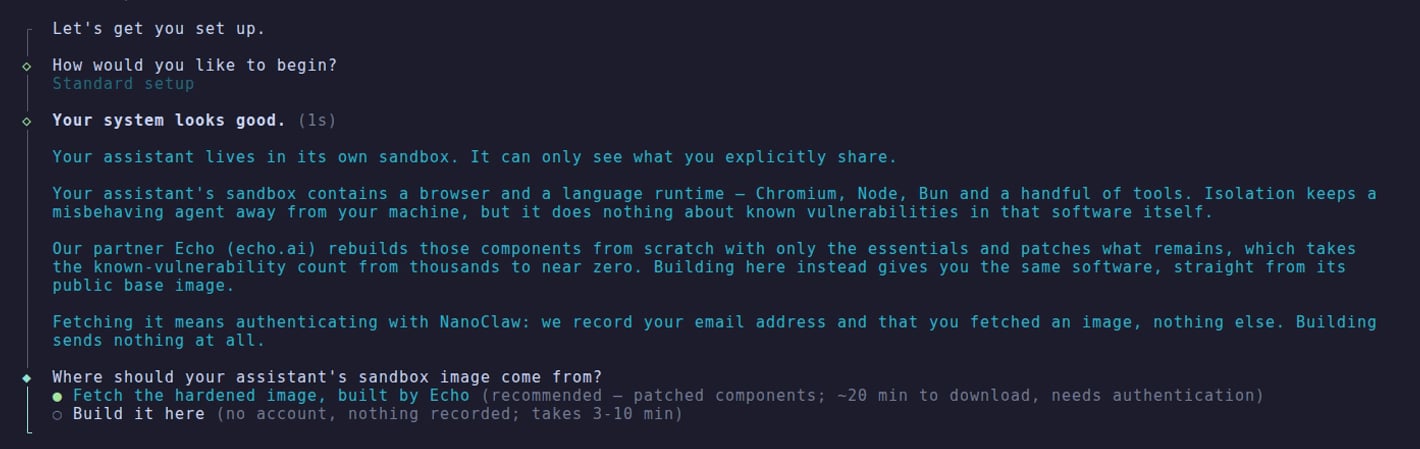
The wizard asks **"Where should your assistant's sandbox image come from?"**. Pick **"Fetch the hardened image, built by Echo"** — the pre-selected, recommended choice — instead of **"Build it here"**.
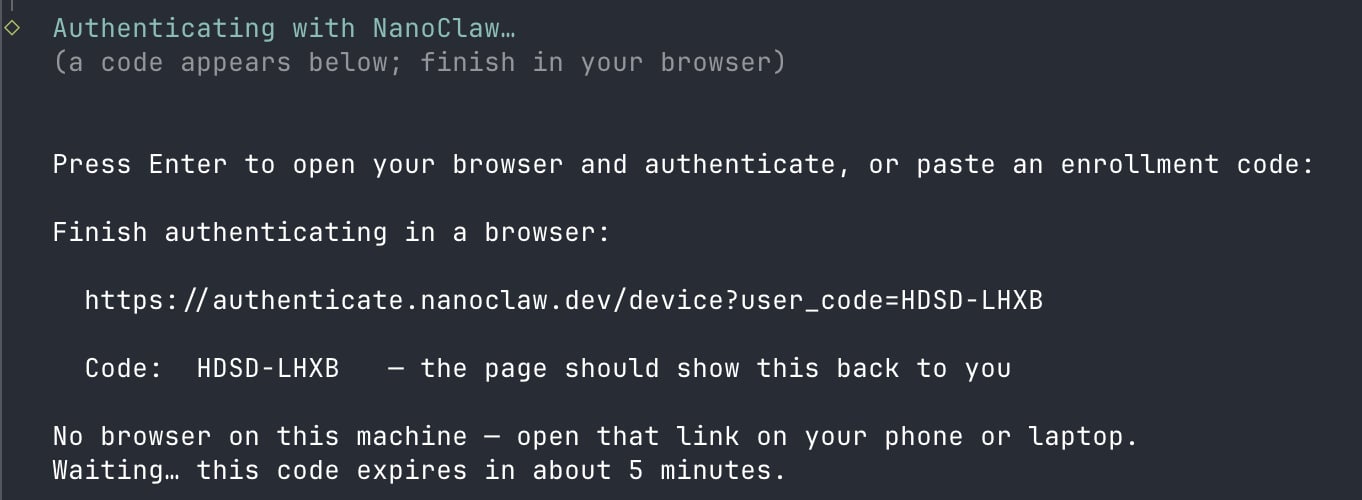
 The terminal prints a link and a short code, and your browser opens on its own — if it doesn't, open the link on any device. The code is valid for 5 minutes.
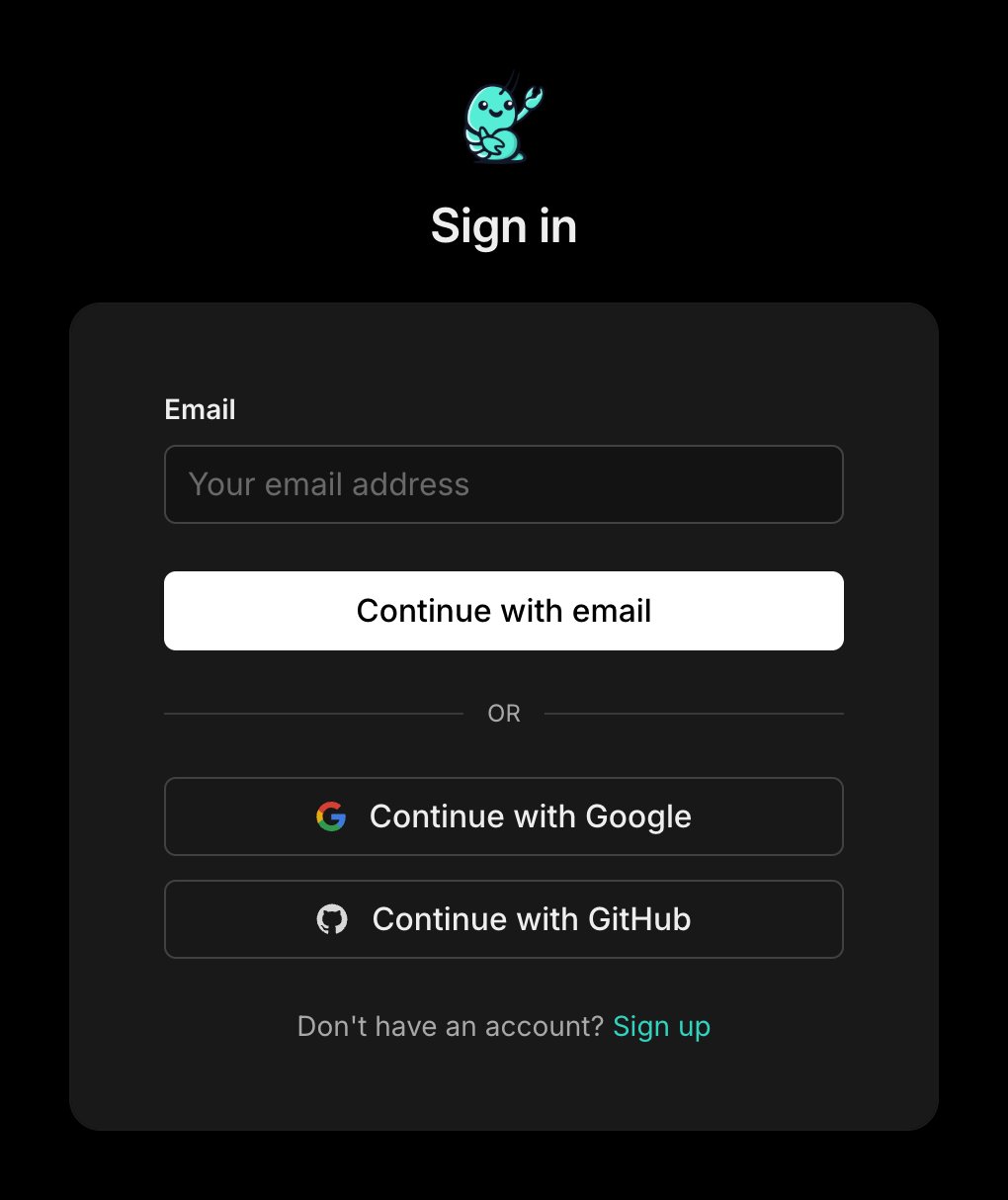
 The page asks you to sign in, or sign up:
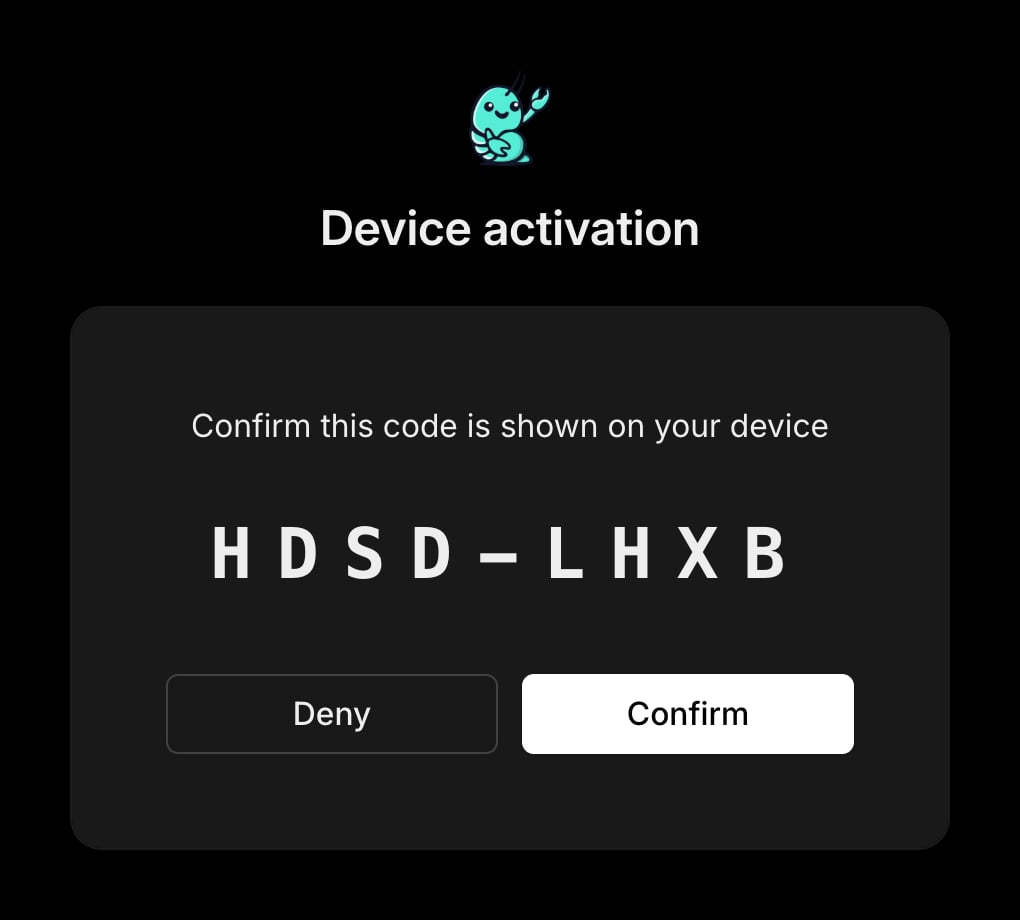
 Then it shows the code back to you — confirm it matches your terminal:
 If authentication doesn't finish, setup says so and builds the sandbox locally instead — nothing breaks, and you can [opt in later](#already-running-nanoclaw).
Let the installer finish. It pulls the image by digest, verifies it matches your checkout, and tags it as this install's sandbox image, so your agents are ready to run on it.
## Already running NanoClaw?
The hardened runtime is additive, so existing installs are never switched over automatically. Opt in whenever you like, from your checkout:
```bash theme={null}
bash setup/registry-login.sh # same browser sign-in as above
./container/build.sh pull # fetch the pinned image
```
To go back to building locally:
```bash theme={null}
pnpm exec tsx setup/index.ts --step registry -- --opt-out
./container/build.sh build
```
## Prefer to build your own local runtime?
That path is fully supported and is not going anywhere. The local build is not deprecated, needs no account, and sends nothing to anyone. If you would rather build and manage the sandbox image yourself, keep doing exactly that. The hardened runtime is simply an additional option.
## Verify the hardened runtime is on
After setup, confirm what your agents are actually running:
```bash theme={null}
pnpm exec tsx setup/index.ts --step registry
```
The status report shows:
* **Image source** — how this install gets its image: `pull a pinned image` or `build here`
* **On this machine** — what is actually present locally
* **Pinned** — the image reference this install tracks
* **Signed in as** — the account, if any
Provenance also rides in the image itself: the `dev.nanoclaw.image-source` label reads `hardened` for the pulled image, `local` for a local build, and `derived` for a per-group image extended on top of the pulled one.
## Troubleshooting and FAQ
Yes. The hardened runtime is free and opt-in — authentication is all it takes. There is no paid tier to unlock it.
No. The local build stays fully supported. The hardened runtime is an additional option, not a requirement, and existing installs are not changed unless you opt in.
No. The hardened runtime reduces exposure to known vulnerabilities by stripping the environment down to essential components. It does not remove all risk, and no environment is fully immune from attack. Runtime containment — [egress lockdown, mount allowlists, resource limits](/operate/hardening) — still does the heavy lifting.
The essential components of the sandbox:
* **Runtime and tools** — Node 22, Bun, pnpm, git, curl, unzip, and tini
* **Browser** — Chromium, with the fonts and libraries it needs
* **Agent layer** — the agent runner's dependencies and the bundled agent CLIs, including Claude Code
Echo rebuilds and patches the image on its own CVE cadence — Echo's own agents research newly disclosed vulnerabilities, build fixes, run compatibility testing, and open pull requests for human review before anything ships. NanoClaw pins the result by digest and serves it from a gated registry.
Not yet. The pre-built image bundles the Claude tooling; installs on other providers build the sandbox locally, and switching a group to another provider prompts before leaving the pre-built image.
Yes. `install_packages` keeps working — it builds a small per-group image on top of the pulled one. That group's image then reports `derived` instead of `hardened`, since the vendor's scan covered the base, not your additions.
Your verified email address and the fact and time that you fetched an image. If — and only if — you consent to product updates during sign-up, that consent is recorded too. Building locally is unauthenticated and sends nothing.
Run `bash setup/registry-login.sh` from your checkout, sign in, then `./container/build.sh pull`. Your install is never switched automatically.
## Learn more
NanoClaw is open source and available at [github.com/nanocoai/nanoclaw](https://github.com/nanocoai/nanoclaw).
Runtime containment: egress lockdown, mount allowlists, and limits.
How NanoClaw isolates and protects your agents.
If authentication doesn't finish, setup says so and builds the sandbox locally instead — nothing breaks, and you can [opt in later](#already-running-nanoclaw).
Let the installer finish. It pulls the image by digest, verifies it matches your checkout, and tags it as this install's sandbox image, so your agents are ready to run on it.
## Already running NanoClaw?
The hardened runtime is additive, so existing installs are never switched over automatically. Opt in whenever you like, from your checkout:
```bash theme={null}
bash setup/registry-login.sh # same browser sign-in as above
./container/build.sh pull # fetch the pinned image
```
To go back to building locally:
```bash theme={null}
pnpm exec tsx setup/index.ts --step registry -- --opt-out
./container/build.sh build
```
## Prefer to build your own local runtime?
That path is fully supported and is not going anywhere. The local build is not deprecated, needs no account, and sends nothing to anyone. If you would rather build and manage the sandbox image yourself, keep doing exactly that. The hardened runtime is simply an additional option.
## Verify the hardened runtime is on
After setup, confirm what your agents are actually running:
```bash theme={null}
pnpm exec tsx setup/index.ts --step registry
```
The status report shows:
* **Image source** — how this install gets its image: `pull a pinned image` or `build here`
* **On this machine** — what is actually present locally
* **Pinned** — the image reference this install tracks
* **Signed in as** — the account, if any
Provenance also rides in the image itself: the `dev.nanoclaw.image-source` label reads `hardened` for the pulled image, `local` for a local build, and `derived` for a per-group image extended on top of the pulled one.
## Troubleshooting and FAQ
Yes. The hardened runtime is free and opt-in — authentication is all it takes. There is no paid tier to unlock it.
No. The local build stays fully supported. The hardened runtime is an additional option, not a requirement, and existing installs are not changed unless you opt in.
No. The hardened runtime reduces exposure to known vulnerabilities by stripping the environment down to essential components. It does not remove all risk, and no environment is fully immune from attack. Runtime containment — [egress lockdown, mount allowlists, resource limits](/operate/hardening) — still does the heavy lifting.
The essential components of the sandbox:
* **Runtime and tools** — Node 22, Bun, pnpm, git, curl, unzip, and tini
* **Browser** — Chromium, with the fonts and libraries it needs
* **Agent layer** — the agent runner's dependencies and the bundled agent CLIs, including Claude Code
Echo rebuilds and patches the image on its own CVE cadence — Echo's own agents research newly disclosed vulnerabilities, build fixes, run compatibility testing, and open pull requests for human review before anything ships. NanoClaw pins the result by digest and serves it from a gated registry.
Not yet. The pre-built image bundles the Claude tooling; installs on other providers build the sandbox locally, and switching a group to another provider prompts before leaving the pre-built image.
Yes. `install_packages` keeps working — it builds a small per-group image on top of the pulled one. That group's image then reports `derived` instead of `hardened`, since the vendor's scan covered the base, not your additions.
Your verified email address and the fact and time that you fetched an image. If — and only if — you consent to product updates during sign-up, that consent is recorded too. Building locally is unauthenticated and sends nothing.
Run `bash setup/registry-login.sh` from your checkout, sign in, then `./container/build.sh pull`. Your install is never switched automatically.
## Learn more
NanoClaw is open source and available at [github.com/nanocoai/nanoclaw](https://github.com/nanocoai/nanoclaw).
Runtime containment: egress lockdown, mount allowlists, and limits.
How NanoClaw isolates and protects your agents.